Governance
Data isolation
How Flexday AI keeps each workspace and Solution apart: enforced by the database, failing closed, with Fact Base roles and workspace-prefixed storage.
- Technical
Last reviewed
On shared infrastructure, the most important promise is that your data is invisible to everyone else. Flexday AI keeps that promise in layers. Each layer is enforced on its own, the most important one is enforced by the database rather than by application code, and that layer fails closed: a request with no workspace scope sees none of the records it protects.
At a glance
- The database enforces the workspace boundary. PostgreSQL row-level security hides every other workspace's Solutions and everything in them from the application itself, including from background jobs. Activity records are filtered by the application.
- Solutions can be hidden too. In a Restricted workspace the database also hides Solutions a person holds no grant on.
- Apps read under a Fact Base role. Flows and Agents can be given one too, and row policies can narrow each end user to their own rows.
- Storage is partitioned the same way. Every object key starts with its workspace.
- Addresses name their workspace. An app on a workspace address can only ever be that workspace's.
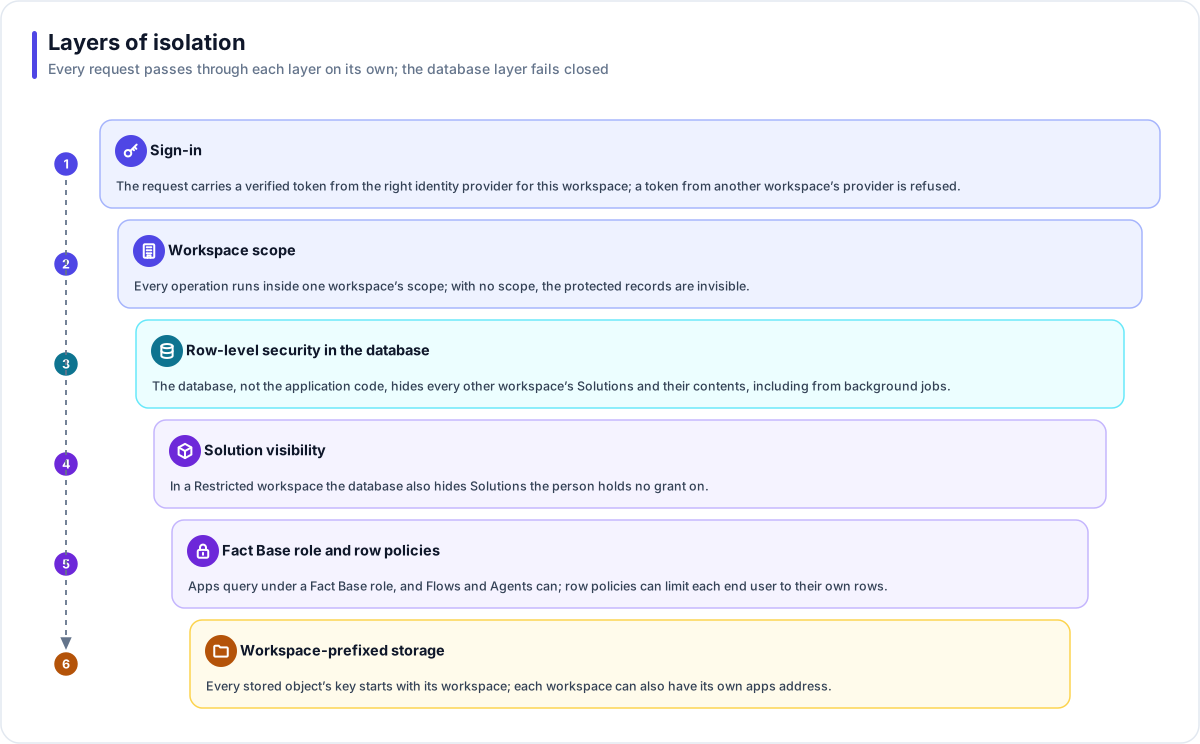
The layers
1. Sign-in
The request carries a verified token from an identity provider. Once a workspace's own provider is configured, a token must come from it: a token from another workspace's provider is refused, and people are never merged across providers.
2. Workspace scope
Every operation runs inside exactly one workspace's scope, set once when the request (or background job) starts. For records under row-level security, code that forgets to set a scope does not see "everything"; it sees nothing.
3. Row-level security in the database
Every Solution and every resource inside it carries its workspace, and forced PostgreSQL policies compare it with the current scope on every read and write. The application's own database identity cannot bypass those policies on a deployment with sign-in enforced, and the API refuses to report itself ready if it could. Background jobs enter the scope of the workspace they belong to before they read anything. Activity records (usage, run history, conversations, the audit trail and the file access log), membership and workspace settings also belong to one workspace, and the application filters them.
4. Solution visibility
In a Restricted workspace, a second set of database policies hides Solutions and their resources from people without a grant; related history and usage are hidden by the application. The policies are restrictive: they can only take visibility away, never add it. Owners and admins keep a rescue path, so nothing can be locked away from the workspace. The platform's operators set a workspace to Restricted.
5. Fact Base roles and row policies
Each Fact Base has its own database schema and roles. A gateway query endpoint always runs its query under one of those roles, so it can reach only the tables and operations the role allows. A Flow step or an Agent grant can name a role too; one that names none reads the whole Fact Base. Row policies, written against the signed-in person, can make two end users running the same query see different rows, and an Agent grant that would bypass declared row policies for end users is refused at publish.
6. Workspace-prefixed storage and addresses
Every stored object's key starts with its workspace, so no path can cross workspaces, and a File Store
never overwrites an earlier version of a file. A missing workspace context fails rather than falling
back.
Apps served on <workspace>.apps.<domain> take their workspace from the address, and an address that
names no workspace is refused.
The runtime gateway
Generated apps and public APIs are served by the gateway, which connects to the database as a least-privilege identity. It can read the configuration it needs and run saved queries under a Fact Base role. It cannot read datasets directly or change your configuration. It records runs, conversations, usage and form submissions directly, and its writes to audited records go through narrow, purpose-built database functions. Its exact permissions are declared in one place and checked automatically, including that it holds nothing more.
Inside a Solution
| Resource | Isolation rule |
|---|---|
| Flows | Every Fact Base, subflow, Connection, Agent, File Store and file a Flow references must be in the same Solution, checked at publish and again at run time. |
| Agents | Every grant's target is checked to be in the same Solution when a session starts. |
| Apps | An app can query only the Fact Bases in its own Solution, through its gateway's endpoints. |
| Documents and files | Audience tags decide which end users may retrieve, cite or download each item. A restricted item answers "not found". |
| Secrets | A Secret Variable belongs to one Solution or Template and never crosses the workspace boundary, even through a published catalog snapshot. |
How this is tested
Isolation is proven, not assumed. Automated tests run as the restricted database identities (not as a superuser, which would bypass the policies), in both directions, and check that every policy is restrictive where it must be. An automated check also fails the build when a new table has not been classified for isolation.
What an evaluator can verify
| To confirm | Where to look in a trial |
|---|---|
| That another workspace's data is invisible | Ask Flexday for two trial workspaces. Signed in to each, neither the Solutions list, global search nor the Usage page shows the other's Solutions. |
| That Fact Base access is limited by role | A Fact Base's Access tab lists its Roles & Grants and its Row-Level Security policies. Call an app's endpoint as two different end users and compare the rows each gets back. |
| That documents follow their audience tags | On a Doc Base's Files tab, Manage access sets a document's audiences. In an Agent's Playground, an owner or admin can preview as an end user with chosen tags and see what that audience can retrieve. |
| That an app's address names its workspace | Where the deployment publishes workspace addresses, an app's live address is <workspace>.apps.<domain>, and an address naming no workspace is refused. |
| How isolation is tested | Ask Flexday to walk you through the isolation test suite and its latest results. |