Components
Platform surfaces
The four places people and systems meet Flexday AI - Studio, generated apps, the Flex Gateway and the Admin Console - and who uses each.
- Everyone
Last reviewed
Flexday AI has four surfaces. Studio is where builders work. Apps is where end users arrive. The Flex Gateway is where apps and outside systems connect. The Admin Console is where Flexday staff operate the platform. Studio, the apps and the Admin Console each have their own address and sign-in rules; the Flex Gateway lives on the apps address.
Note
In one sentence: four surfaces, one platform: builders use Studio, end users use apps, systems use the gateway, and Flexday staff use the Admin Console to operate the platform. A support session inside your workspace is possible only while its Support access setting is on, and your owners can turn it off.
Why it matters
- The right door for each person. End users never need a Studio account. Builders never need to touch infrastructure.
- Clear security boundaries. The Studio, the apps, the API and the staff console are separate origins, so a problem in one cannot borrow another's session.
- Your address for your apps. Where the deployment publishes workspace addresses, each workspace's apps are served on its own address, so the people using them see whose app it is.
Key concepts
| Surface | Address | Who uses it |
|---|---|---|
| Studio | app.<domain> | Builders and workspace admins |
| Apps | The shared apps.<domain>, and <workspace>.apps.<domain> where the deployment publishes workspace addresses | End users of generated apps |
| Flex Gateway | On the apps address, under /api/<gateway>/… | Generated apps, partner systems, scripts |
| Admin Console | admin.<domain> | Flexday staff only |
How it works
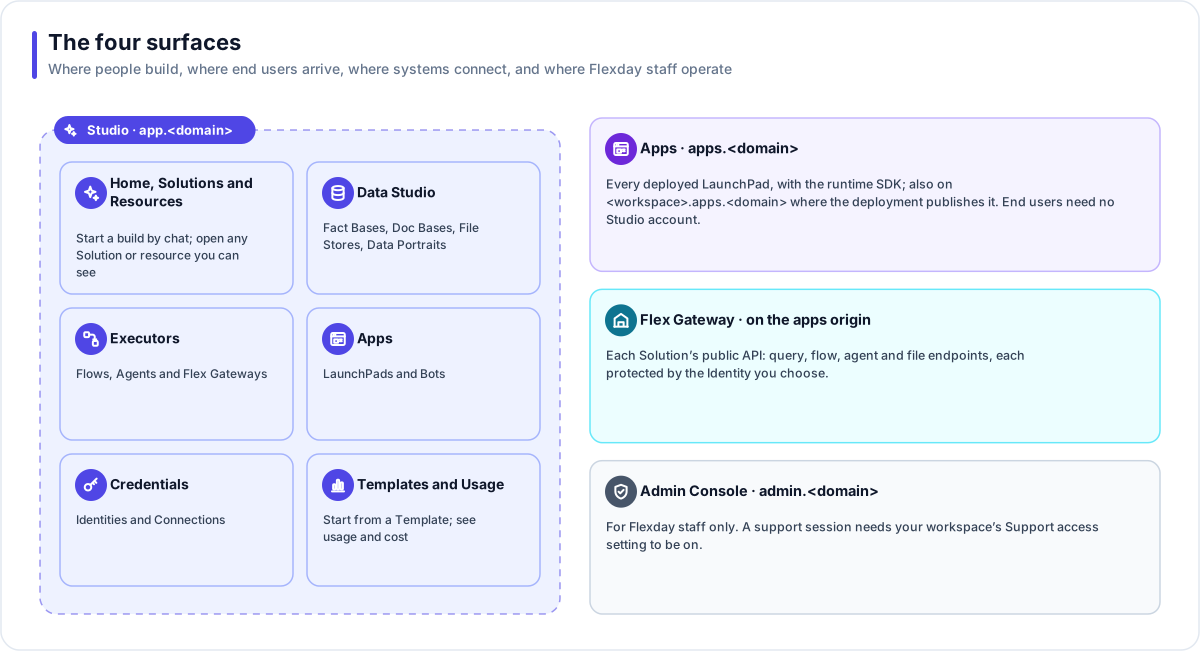
Studio
Studio is the builder's web app. The sidebar is organised by what you are working with:
| Area | What is in it |
|---|---|
| Home and Solutions | Start a build by chat, or open any Solution you can see. |
| Templates | Your workspace's Templates and the global catalog. |
| Resources | Everything created in the workspace, in one list. |
| Data Studio | Fact Bases, Doc Bases, File Stores and Data Portraits. |
| Executors | Flows, Agents and Flex Gateways. |
| Apps | LaunchPads and Bots. |
| Credentials | Identities and Connections. Variables are on each Solution's Variables tab. |
| Usage | Usage and AI cost for the workspace. |
Most resources have their own page with a consistent header, an Overview first, and every view as its own shareable link; Connections and Variables are edited from their Solution's lists instead. Most resources end their menu with a shared Insights group (Analytics, Usage, History or Versions, whichever apply). Global search looks up Solutions and the resources in them, Templates and people.
Studio is where the Builder runs, where workspace owners and admins manage members and settings, and where changes to resources and settings are recorded in the audit trail against the person who made them.
Apps
Every deployed LaunchPad is served on the apps address with the runtime SDK already in
the page. End users need no Studio account: the gateway decides, per endpoint, whether they sign in, and
with which Identity. The shared apps.<domain> address keeps working for every link ever
handed out.
Flex Gateway
The Flex Gateway is each Solution's public API. It lives on the apps address, so a
generated app calls its own origin. Partner systems and scripts call the same endpoints with a machine
credential. Microsoft Teams posts to a Bot's webhook on the shared apps.<domain> address.
Admin Console
The Admin Console is Flexday staff's own surface, with its own sign-in and its own roles. Staff create workspaces, set plans and quotas, watch health, background jobs and incidents, and review audit and support sessions. Support access to your workspace is on until a workspace owner turns it off (workspace menu → Settings → Support access). A support session is read-only by default, lasts at most an hour, is recorded, and your owners are emailed when it starts. See Platform operations.
Works with
- Workspace: Studio shows one workspace at a time, with a switcher.
- Addresses and domains: the five host families behind these surfaces.
- Identity and access: how builders, end users and staff each sign in.
Governance and limits
| Area | What applies |
|---|---|
| Boundary | Studio, the apps (with their Flex Gateway) and the Admin Console are separate origins, and the Studio API has its own. The API and the apps are always on different origins. |
| Access | Studio: workspace and Solution roles. Apps and gateway: the Identity attached to each gateway. Admin Console: staff roles, re-checked on every request. |
| Safety | The apps address stays frameable so the Studio preview works. Staff support sessions cannot be used against a gateway. |
| Limits | Apps are always served from the shared apps address, and also from the workspace's own address where the deployment publishes it. |