Components
Solution
The container for one thing you are building. It owns the app, data, automations and credentials, and keeps them apart from everything else.
- Everyone
Last reviewed
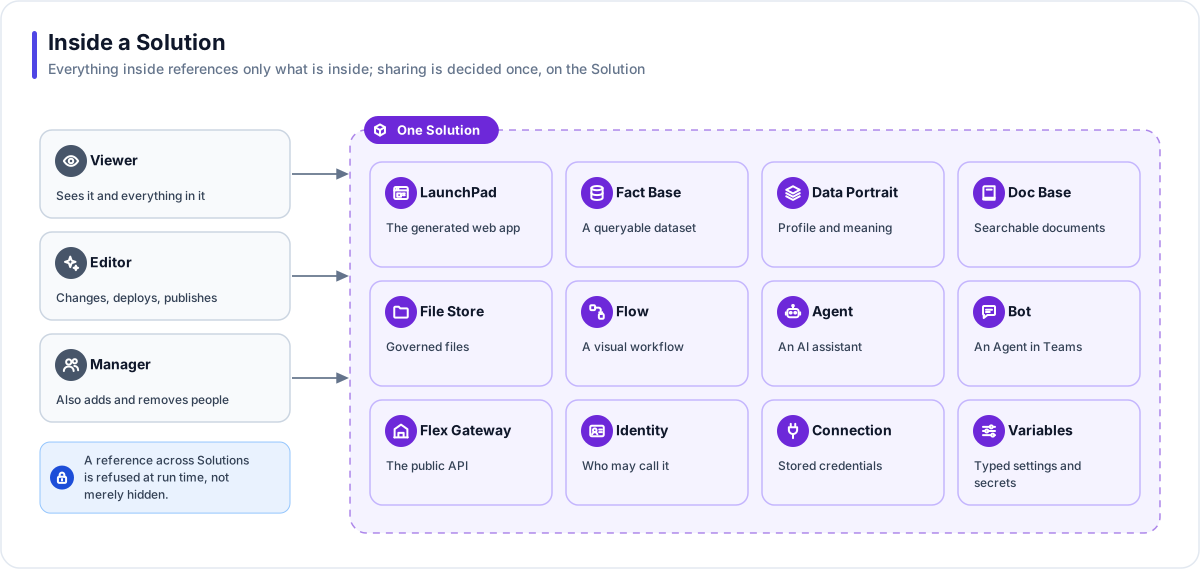
A Solution is one thing you are building, such as a sales dashboard, an HR assistant or a service desk copilot. Everything built for that purpose lives inside it: the app, the data, the documents, the automations, the AI agents, the public API and the credentials they use. Sharing is decided once, on the Solution, and everything it owns follows.
Note
In one sentence: a Solution is the container and the boundary. Every resource is created inside one, and may reference only what is inside the same Solution.
Why it matters
- One unit to reason about. A Solution is what you build, share, cost, export and reuse. There are no stray resources to track down.
- Containment by design. A Flow, an Agent or an app in one Solution cannot reach data in another. The platform refuses the reference when it runs, not just in the lists you see.
- Sharing in one place. Grant a person Viewer, Editor or Manager on the Solution and they get the right access to everything in it.
- All-in cost. Usage and AI cost roll up per Solution, including every completed model call made on its behalf, so you know what each piece of work costs.
Key concepts
| Term | What it means |
|---|---|
| Ownership | Every resource has exactly one owner: a Solution or a Template. |
| The boundary | A reference to something in another Solution is refused at run time by Flows, Agents and apps. |
| Two shapes | Fact-base-backed (the app reads a live Fact Base) or a data-less prototype (the app carries its own sample data). The Builder decides from your request. |
| Status | Derived, never set by hand: Building, Ready (a live app or a provisioned Fact Base), Draft or Empty. |
| Name and title | The name is fixed at creation or import and is unique in the workspace. The title and description stay editable. An app's address comes from its LaunchPad's own name, set when the LaunchPad is created. |
| Solution roles | Viewer, Editor and Manager. Whoever creates a Solution becomes its first Manager. |
How it works
- Describe. On the Studio home page you type what you need and attach up to 10 files.
- Created at once. A new Solution with a deterministic name, and your Manager grant, is written in a single step. You are in the Builder within about a second.
- Built in the background. The Builder decides what the Solution needs and creates each resource inside it: a Fact Base loaded with your data, an app, saved queries, Flows, Agents and the wiring between them. Attachments are kept in a File Store that belongs to the Solution.
- Titled. An AI-written title and description arrive after the first reply. If that step fails, the deterministic name stands.
- Refine, share and run. You keep chatting to change it, invite people, and its app, API and Bots run inside its boundary.
What a Solution can own
| Resource | What it is |
|---|---|
| LaunchPad | A generated web app with a Draft, versions and one live version |
| Fact Base and Data Portrait | A queryable dataset with its meaning layer, profile and ontology |
| Doc Base | A searchable document collection with citations |
| File Store | Governed files with versions, scanning and audiences |
| Flow | A visual workflow run as a durable job |
| Agent | A conversational AI assistant with explicit tool grants |
| Flex Gateway | The Solution's public API: query, flow, agent and file endpoints |
| Identity | Who may call the gateway |
| Connection and Variable | Credentials, typed settings and secrets, used only at run time |
| Bot | A published Agent inside Microsoft Teams |
Where you work with it
A Solution's workspace in Studio lands on Overview, which shows everything it owns with live counts. From there you can open the Builder, the Brief (the pinned instructions the Builder reads every turn), People and Exports, a Resources menu of everything it owns, and the Analytics, Usage and History views.
Who sees a Solution
| Role | What they can do |
|---|---|
| Viewer | See the Solution and everything in it: app, data, runs and sessions. |
| Editor | Change it: build, edit resources, deploy and publish. |
| Manager | Everything an Editor can, plus add and remove people and read form responses. |
Your workspace decides the starting point. In an Open workspace (the default) every member sees every Solution. In a Restricted workspace, a setting the platform's operators apply (there is no Studio switch for it), people see only the Solutions they hold a grant on. Grants can expire. A workspace member who opens a Solution they cannot see can choose Request access, which emails its Managers (or the workspace owners and admins when it has none). See Identity and access.
Warning
Deleting a Solution tears everything down: Flow runs are cancelled, Agent sessions ended, managed Teams Bots unregistered, Flow and Agent versions cleared, and document indexes and files removed. Then the Solution is deleted, and its Fact Base schemas and app files are dropped. It cannot be undone. Export it first if you might need it again.
Works with
- Belongs to one workspace. Workspace owners and admins always see it.
- Built and refined by the Builder from a plain-English request.
- Exported whole as one bundle, which always imports as a new Solution, or published as a Template. See Reuse and portability.
- Email rules (send rate, recipient allow-list, body redaction) are set per Solution.
Governance and limits
| Area | What applies |
|---|---|
| Boundary | References across Solutions are refused at run time by the Flow engine, by Agent grants (checked again when a session starts) and by app connections. |
| Access | A Solution role narrows the workspace role and never widens it. Owners and admins keep a rescue path so nothing is locked away. |
| Versions | A Solution has no draft or published state of its own. Each resource keeps its own versions. |
| Safety | An unshared Solution is invisible, not forbidden, in lists and search. Only Managers (and workspace owners and admins) read form responses. Every change to the Solution, its sharing and its resources is recorded in the audit trail; runs, conversations and versions are kept as their own history instead. Exports never carry secrets. |
| Limits | The workspace plan's quotas apply (Fact Base schemas, rows, storage, AI tokens and request rate). There is no cap on how many resources a Solution holds. Names are unique within a workspace. |