Components
Agent
A conversational AI assistant you configure rather than program, with explicit tools, guardrails, budgets and citations.
- Everyone
- Technical
Last reviewed
An Agent is a conversational AI assistant that you configure rather than program. You give it instructions, a model, an explicit list of tools, guardrails and budgets, and it works out how to help each person it talks to. It can look things up in your data and documents, run your automations, send an email, or hand off to a person by email.
Note
In one sentence: an Agent is the flexible, conversational half of a Solution's automation: a Flow runs the path you drew, an Agent works out the path, and everything it may do is an explicit grant.
Why it matters
- One assistant, many front doors. The same Agent answers in the Studio Playground, in a generated app, through the API and in Microsoft Teams, with the same instructions, grants, guardrails and budgets. What each person can reach depends on who they are, and forms are not available in Teams.
- The boundary is a list, not a prompt. An Agent can use only the tools you grant it, inside its own Solution. No wording in a message can widen that.
- Answers you can check. It cites the documents whose retrieved passages its answer matches, and you can tell it to search your own knowledge before it states anything about your business.
- Tested before it ships. Evaluations with golden test cases can be required to pass before a new version is published.
- Measured after it ships. Agent analytics shows real use: volumes, people, tools, sources, guardrail events and feedback.
Key concepts
| Term | What it means |
|---|---|
| Definition and version | The draft you edit: instructions, model, tools, guardrails, budgets and memory. Publishing checks it and creates an immutable, numbered version. |
| Model | An Anthropic Claude model, or an Azure AI Foundry GPT model where your deployment offers one. |
| Grant | One capability the Agent may use, such as querying one Fact Base. There are ten kinds. The list of grants is the security boundary. |
| Intent | A named purpose ("billing questions") that helps the Agent route a request. Intents guide; grants decide. |
| Session and turn | A session is one conversation. A turn is one message and everything done in response, run as a durable background job. |
| Guardrails | Automatic checks before the model runs and after it answers. A blocked input never reaches the model. |
| Blocked topic | A subject checked before the Agent's model runs: a keyword by exact match, a topic described in words by one fast classification. A keyword blocks the message; a described topic blocks it or flags it silently, and either way can start a Flow. |
| Budgets | Per-turn budgets for tool calls, output tokens and time, under platform ceilings, enforced by the engine between steps. |
| Grounding | The Answer only from connected knowledge switch: the Agent is told to search its sources before stating a fact about your business and to say so when it cannot find one, and is reminded once if it answers without searching. |
| Delegation | Handing one task to a specialist Agent, which runs one isolated turn and returns only its answer. The original Agent stays in charge. |
| Handoff | Ending the conversation so a person can follow up: the session ends and, if you listed recipients, they are emailed the details. No one takes over the chat. |
How it works
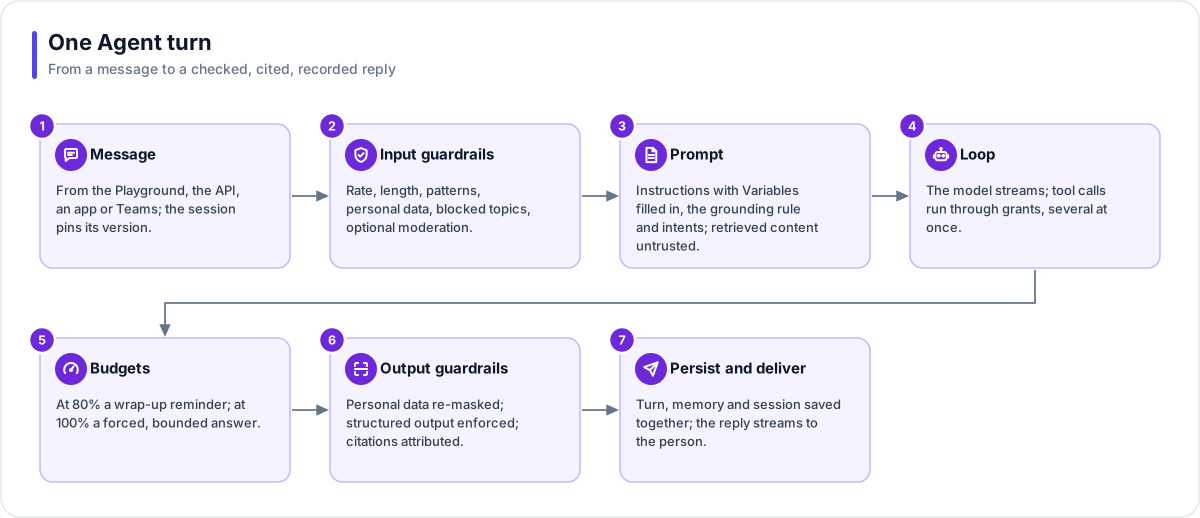
- Message. A message arrives from the Playground, the API, a generated app through the Flex Gateway, or Teams through a Bot. A session with the published Agent has already pinned its version (a Playground chat with the draft follows your latest edits), every session has pinned the Variable values it opened with, and a signed-in caller's audience tags are read again from their sign-in on every message.
- Input guardrails. Checks run cheapest first: rate, length, blocked patterns, personal data (block, mask or warn), keyword topics, one fast classification for meaning-based topics, then optional moderation. The refusal a person sees comes from the first check that blocks.
- Prompt. A platform preamble, your instructions (with any Variables filled in), the grounding rule and the intent routing table form a stable prefix that the model can cache. Notes and recent history follow. Anything retrieved is marked as untrusted content.
- Loop. The model streams its answer. When it calls tools, a batch runs at the same time, and each tool uses one grant. A tool that pauses the turn, such as a question for the person or a form, is handled on its own.
- Budgets. At 80% of any budget the Agent is told to wrap up. At 100% it gives a bounded final answer.
- Output guardrails. When personal-data masking is on, personal data is masked in the reply and in the stored transcript. When the Agent has an output format, its answer is requested in that format and checked, with retries; an answer that never matches comes back as text only. Citations are attached for the retrieved documents the answer's wording matches.
- Persist and deliver. The turn, its memory and the session are saved together, events stream live, and the Playground, the app or the Bot shows the reply.
A turn survives a restart. If the worker running it stops, the turn resumes from its record of the tools that already ran. A turn whose worker has gone for good is failed by a platform sweep, which frees the session.
The tool belt
| Grant | What the Agent can do |
|---|---|
| Fact Base query | Read a Fact Base schema and run read-only queries, saved or written on the spot, under a Fact Base role. New grants default to the read-only reader role. |
| Doc Base search | Search a Doc Base with hybrid search, filtered by audience, with citations. |
| File Store | List and read files in a File Store, and share a 15-minute download link when the app's gateway serves that store's downloads (never in a group chat). Write files, or present a document as a card, only when granted. |
| Run Flow | Run a published Flow to completion and use its output. |
| Run Agent | Delegate one task to a published specialist Agent in the same Solution. |
| HTTP request | Call addresses that start with an allow-listed prefix. No hop, redirects included, may reach a private network, and stored credentials go only to the original host. |
| Send email | Send at most one email per turn, under the Solution's email rules. |
| Channel message | Send a Teams message through a Bot. |
| Handoff | End the session so a person can follow up, emailing the recipients you list. |
| Memory | Save short notes and recall them later in the same conversation. |
Where you work with it
Open Executors → Agents and choose New agent, or let the Builder create one. An Agent's workspace has a tab per concern: Overview, Preview (a map of intents and tools), Instructions, Tools, Intents, Knowledge, Guardrails, Playground, Evals and Sessions, then the shared Insights tabs: Analytics, Usage, History and Versions.
- Playground and history. You chat with the draft or the published version. Your own Playground conversations are kept in a personal history, separate from any deployed app.
- Preview as. Workspace owners and admins can test a turn as if they held a chosen set of audience tags, in the Playground or in a live app. Anything that would send, write, run a Flow, call out or delegate is refused while previewing.
- Evaluations. Golden cases with assertions (text, pattern, JSON schema, tool use, call and token caps, and a model-scored rubric) run against the real engine. You can require the default set's latest run to pass on the current draft before publishing; editing the draft closes the gate again.
- Analytics. Counts real use only. Playground and evaluation conversations are excluded, although they still appear under Usage because they cost money.
- Delegation. A specialist runs one isolated, version-pinned turn under the original caller's access and returns only its final answer. It cannot ask the person anything. Specialist calls share one allowance across the whole conversation turn.
Tip
Use a Flow when the steps are fixed and an Agent when the interaction is a conversation. An Agent whose tool is a Flow gets reliable execution inside a flexible conversation.
Works with
- Fact Base, Doc Base and File Store: the knowledge an Agent reads, each through its own grant.
- Flow: an Agent can run a published Flow, and a Flow can run an Agent. They share one depth limit.
- Interactive cards: present a document or collect a validated form inside the conversation.
- Flex Gateway: the agent endpoint a generated app talks through.
- Bot: one published Agent answering in Microsoft Teams.
- Connection: the stored credential an HTTP or email grant can use.
- Variable: settings the instructions can read, key by key.
Governance and limits
| Area | What applies |
|---|---|
| Boundary | Everything an Agent reaches is in the same Solution, checked at publish and again when a session starts. A delegated Agent runs under the original caller's access and can narrow it, never widen it. |
| Access | The grant list is the boundary. Intents and topics can only hint at, or start, what is granted. A signed-in end user's identity reaches a Fact Base's row policies, and publishing is refused if a grant without a role would bypass them. |
| Versions | Publishing creates a numbered version after automatic checks: errors block, warnings can be confirmed. A session with the published Agent pins its version, and every session pins its Variable values. There is no unpublish; you switch the Agent off instead. |
| Safety | A guardrail set to block fails closed: if its check cannot run, the message is refused. A flagged topic is never announced to the person. Tool results are marked untrusted. Outbound calls must start at an allow-listed prefix and never reach a private network. An Agent can never read a secret Variable. |
| Limits | Per-turn ceilings: 30 tool calls, 64,000 output tokens and 10 minutes (defaults 15, 32,000 and 2 minutes). Up to 1,000 turns per session, 20 grants, 40 intents, 40 blocked topics and 32,000 characters of instructions. 4 specialist calls per turn in total, at most 2 separate delegations running at once, 3 levels deep. |
Related
- AI agents: what you can build with Agents.
- AI safety: guardrails, grounding, budgets and evaluations in depth.
- AI models: which models run an Agent and how they are chosen.
- Limits and quotas
- Glossary: Agent, Agentic loop, Grant, Grounding, Guardrails, Preview as.