Architecture
Background jobs and resilience
How Flexday AI runs long work as durable jobs that survive restarts, stream progress live, recover from crashes and never double an outside effect.
- Technical
Last reviewed
Anything that takes more than a moment in Flexday AI runs as a durable background job: a Builder turn, a Flow run, a document being indexed, an Agent turn, a data profile, an export or import. Jobs survive restarts and stream their progress live. When a worker fails, Builder and Agent turns resume and other jobs are marked failed rather than left hanging, and a step that already sent an email or wrote to an outside system does not do it again.
At a glance
- Web requests never wait on long work. They start a job and return; the browser follows the job's live stream.
- One live job per resource and type. Starting the same thing twice reattaches to the running job.
- Crashes are expected and handled. A Builder or Agent turn that loses its worker is run again and resumes from a record of the tools that already ran; any other job is failed rather than run twice.
- At least once inside, not repeated outside. Every outside effect claims an idempotency key first.
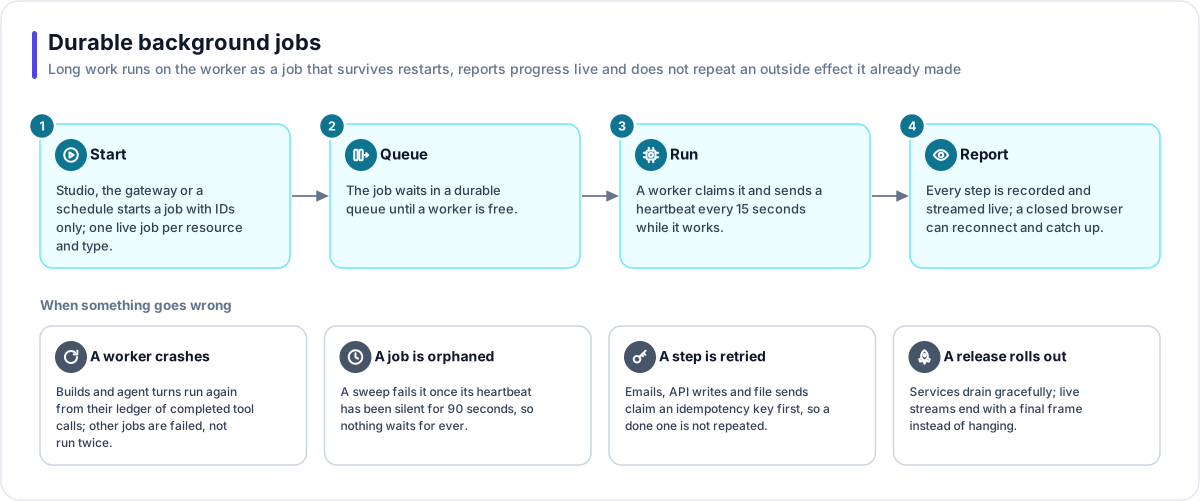
How a job runs
- Start. Studio, the gateway or a schedule starts a job, handing over IDs only. Everything else is read fresh when the job runs, so a job never acts on stale data it was handed.
- Queue. The job waits in a durable queue until a worker is free.
- Run. A worker claims it, marks itself as the owner, and sends a heartbeat every 15 seconds.
- Report. Every step is recorded as an event and pushed live. A browser that disconnects can reconnect and replay from where it left off.
Jobs can be stopped. Stopping is cooperative: a Builder turn keeps the work it has done and can be run again; a Flow run is cancelled; a profile stops cleanly.
When something goes wrong
| Case | What happens |
|---|---|
| A worker crashes | Builder and Agent turns are run again and resume from their ledger of completed tool calls, so tools with side effects are not repeated. Other jobs, such as a Flow run or an import, are failed rather than run twice; an import stopped this way can leave a partly created Solution. |
| A job is orphaned | A platform sweep fails any job whose heartbeat has been silent for 90 seconds, so nothing waits for ever. No process ever guesses ownership at start-up, so running several workers is safe. |
| A step is retried | Emails, HTTP calls that are not reads, application writes, file sends and fetches claim an idempotency key made from the run, the step and the loop iteration. A repeat returns the first result. |
| The effect's outcome is unknown | If a process stops between doing something and recording it, a repeat within the next 15 minutes is refused as "in doubt" rather than risk doing it twice. |
| A release rolls out | Services stop taking new work, finish what they have, and end live streams with a final message. |
Scheduled work
Recurring platform work is declared as scheduled jobs that the worker runs, rather than timers inside a web server. They include:
| Sweep | What it does |
|---|---|
| Stale-job sweep | Fails jobs whose worker has gone for good |
| Flow schedules | Starts scheduled Flows and wakes Flows whose delay has passed |
| In-app events | Delivers events that trigger Flows, retrying and then parking after 5 failed attempts |
| Idempotency sweep | Clears expired idempotency keys |
| Usage | Takes usage snapshots and moves storage counters into the database |
| Retention | Deletes files past their retention window and old versions past their retention count |
An in-app event is written in the same database transaction as the change that caused it, so an event is never announced for a change that did not happen, and never lost for one that did.
Why this matters for you
- Close the browser. A build or a long import carries on and you can come back to it.
- Scale safely. The worker scales out, and no job depends on which copy runs it. Running more copies does not change behaviour.
- Trust the side effects. A step that already sent an email, created a ServiceNow ticket or posted to Teams is not repeated when the platform retries it. An email whose send failed with an error may be tried again, so in rare cases it arrives twice.