Architecture
Architecture overview
How Flexday AI fits together, who and what it talks to, and the six design principles behind every part of it.
- Everyone
Last reviewed
Flexday AI is one platform with a small number of parts: web applications people open, API (application programming interface) services that do the work, a background worker for anything slow, and three data stores. It sits between the people who build and use Solutions and the outside systems it relies on, such as identity providers and AI model providers. Six design principles shape every part of it, and they are what make it safe to hand AI-built software to real users.
At a glance
- Everything is a governed resource. What you build lives inside a Solution, with an owner and access rules; changes to it are audited, and the parts that publish (data, apps, Flows and Agents) are versioned.
- Isolation is enforced by the database. Row-level security keeps one workspace's Solutions and resources invisible to another, even if application code makes a mistake. Activity records such as run history, conversations, usage and the audit trail carry their workspace and are filtered by it in the application.
- Slow work never depends on a browser. Builds, workflows and conversations run as durable background jobs that survive restarts.
- Every outside dependency sits behind an adapter, so sign-in, AI models, storage and messaging providers can change without redesigning the platform.
- AI output is checked by code. Deterministic checks surround the model, so recurring mistakes are caught and repaired automatically.
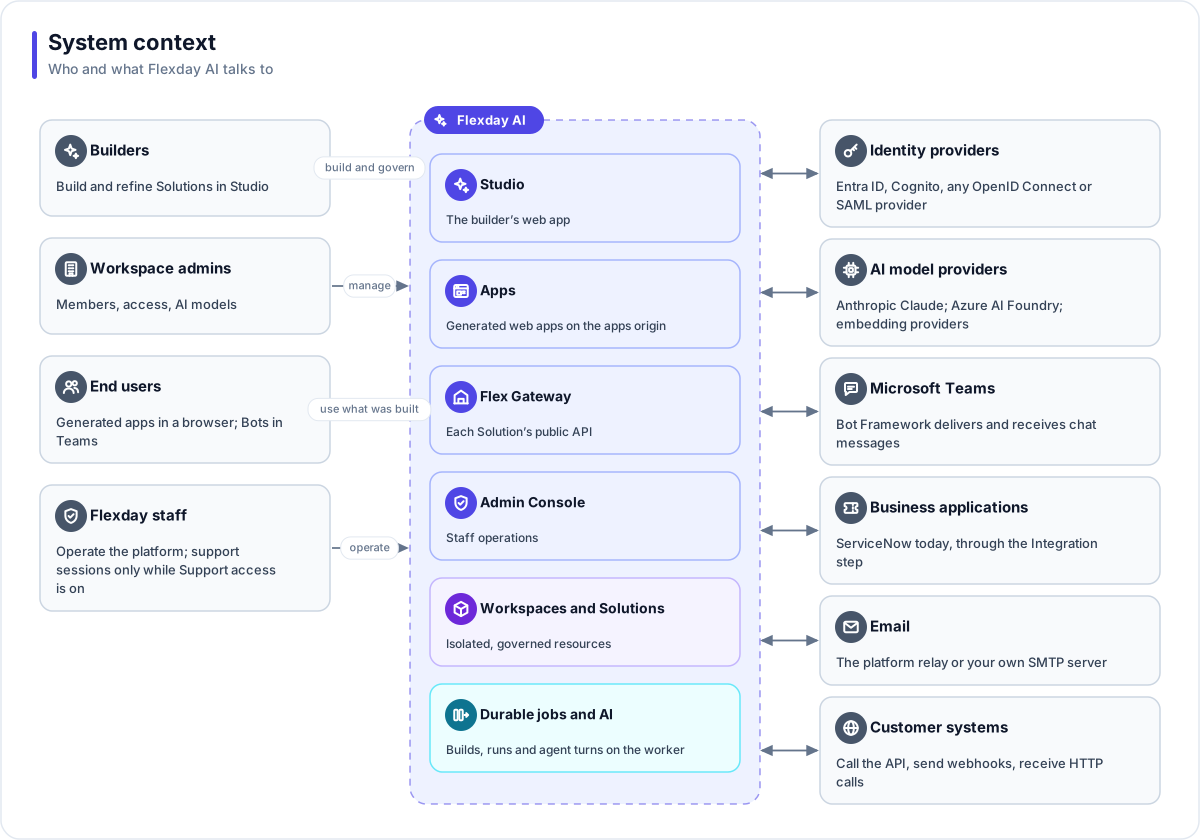
Who and what Flexday AI talks to
People
| People | How they reach the platform |
|---|---|
| Builders | The Studio, to build and refine Solutions by chat |
| Workspace admins | The Studio, to manage members, Solution access and AI model settings |
| End users | Generated apps in a browser, or a Bot in Microsoft Teams. No Studio account is needed |
| Flexday staff | The Admin Console, with a staff-only sign-in (a separate staff identity provider where the deployment configures one) |
Outside systems
| System | What it is used for |
|---|---|
| Identity providers | Signing in builders (Microsoft Entra ID, Amazon Cognito, or your own OpenID Connect or SAML provider) and, through an Identity, signing in end users |
| AI model providers | Anthropic Claude for reasoning; Azure AI Foundry GPT models where a deployment configures them; Voyage AI, OpenAI or Azure for search embeddings |
| Microsoft Teams | Delivering messages to and from Bots through the Microsoft Bot Framework |
| Business applications | Acting in systems such as ServiceNow through the Integration step |
| Sending mail from Flows and Agents over SMTP (Simple Mail Transfer Protocol), through the platform relay or your own mail server | |
| Customer systems | Calling a Solution's Flex Gateway endpoints, or starting a Flow with a signed webhook |
Design principles
Everything is a governed resource
Every app, dataset, document collection, file store, workflow, agent, API and credential is created inside a Solution (or a Template) and may reference only what is inside the same one. A reference across Solutions is refused when it runs, not merely hidden from a list. Fact Bases, Data Portraits, LaunchPads, Flows and Agents keep a draft and immutable numbered versions, and a Doc Base records every build of its index; Flex Gateways, Identities, Connections and Bots change in place. Every change to a resource's definition or settings is written to the audit trail against the person who made it (runs and conversations are kept as their own history, and Fact Base data rows are outside the trail), and every AI call is recorded and its cost attributed to the Solution (or Template) it served. See Change control and versioning.
Isolation is enforced in the database
Every workspace-owned row carries its workspace. PostgreSQL row-level security makes other workspaces' Solutions and resources invisible to the platform's own connections; activity records such as run history, conversations, usage and the audit trail are filtered by workspace in code. A request or job that has lost its workspace context sees none of those resources rather than all of them. Sharing a Solution inside a workspace is enforced the same way. Stored files carry the workspace in every storage key. See Data isolation.
The API and the apps live on separate origins
The Studio and the Admin Console are web pages that hold no data of their own; they call the Studio API at its own address. Generated apps are served from a different address, the apps origin, and call only their own origin, which forwards to the gateway. AI-written app code therefore never shares a browser origin with the Studio's signed-in session. See Addresses and domains.
Long work runs as durable jobs
A build turn, a Flow run, a document being indexed or an Agent's reply runs as a background job on a separate worker. Progress is stored, not just streamed, so a reloaded page replays what it missed. Heartbeats detect a lost process, interrupted build and agent turns resume from a ledger of what already happened, and outside effects such as an email, an outbound write or a file send carry an idempotency key, so a retry after a recorded success replays the result instead of repeating it. See Background jobs and resilience.
Every outside dependency sits behind an adapter
Sign-in providers, AI chat and embedding providers, vector stores, object storage, secret stores, malware scanners, messaging channels, business applications and email all sit behind named adapters. Which driver a deployment uses is configuration, so the same code runs on Flexday SaaS, AWS and Azure. See Extensibility.
Deterministic checks surround the AI
The model proposes; code checks. When the Builder finishes a turn, the platform wires the app's saved queries into it and checks its code against fixed rules, and anything the person asked for that is not built for real must be declared as a placeholder, which the person is shown. Recurring model mistakes are repaired by deterministic fixes rather than prompt tweaks. Agent guardrails run in code before and after the model, a publish runs a lint first, and a schema change is planned before it runs, and only that exact plan can be applied. See AI safety.
How the architecture pages fit together
| Page | Answers |
|---|---|
| Runtime services | Which services run, what each does and how it scales |
| Request paths | What happens when a builder, an end user or a Teams message makes a request |
| Data architecture | Where each kind of data lives and how it is isolated |
| Background jobs and resilience | How long work survives failures, and how retries avoid repeating its effects |
| AI models | Which models run which tasks, and how they are chosen and metered |
| Extensibility | The adapters and the drivers available today |
| Deployment models | SaaS or private cloud, and what is shared, dedicated or yours |
| Reference deployment on AWS and on Azure | The cloud services a private deployment uses |
| Addresses and domains | The five public host families and why they are separate |