Capabilities
Capabilities overview
What you can achieve with Flexday AI, from a plain-English request to governed apps, data, automations and AI agents, and who each capability serves.
- Everyone
Last reviewed
Flexday AI turns a request written in plain English into working software: a live app, the data behind it, the automations around it and the AI assistants that answer questions about it. Everything you build stays governed and reusable, and the parts that run keep numbered versions. This section describes what you can achieve, in business terms, and points to the component pages that explain how each part works.
Note
In one sentence: describe what you need, and Flexday AI builds it inside a Solution that you can refine by chat, share with the right people, run safely and reuse.
At a glance
- Nine capabilities, one platform. Building, data, knowledge, automation, AI agents, apps, APIs, reuse and insight all work on the same resources, so nothing needs to be glued together.
- Start by talking, finish with control. The Builder does the first cut from a conversation; every resource it creates can also be opened and edited by hand.
- Governance is built in. Access, isolation, audit and cost tracking apply to every capability, and apps, Flows, Agents and datasets keep numbered versions.
- Nothing is a dead end. A working Solution can become a Template for others or be exported whole to another workspace or deployment.
The capability map
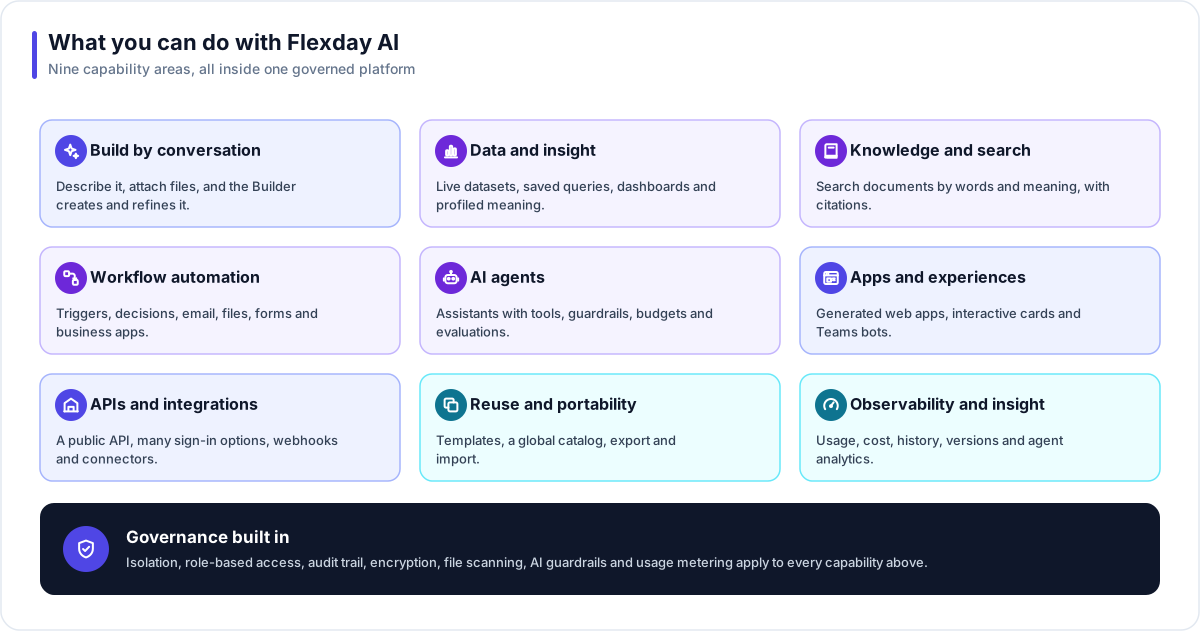
| Capability | What it gives you | Built from |
|---|---|---|
| Build by conversation | A working Solution from a plain-English request, refined by chat | Builder |
| Data and insight | Your data as a live, queryable dataset with dashboards and a business description | Fact Base, Data Portrait |
| Knowledge and search | Search across your documents with answers that cite their sources | Doc Base, File Store |
| Workflow automation | Visual workflows that run on a schedule, a webhook, an event or a button | Flow, Integration |
| AI agents | Conversational assistants with explicit permissions, guardrails and evaluations | Agent |
| Apps and experiences | Web apps, conversations with documents and forms, and Microsoft Teams bots | LaunchPad, Interactive cards, Bot |
| APIs and integrations | A public API for each Solution and typed actions in your business applications | Flex Gateway, Identity, Connection |
| Reuse and portability | Reusable starting points and whole-Solution export and import | Template, Variable |
| Observability and insight | Usage, cost, history, run trails and real-world Agent analytics | Every resource |
Who each capability serves
| Persona | What they typically want | Start with |
|---|---|---|
| Business user | A working tool for a team process, without waiting for a development queue | Build by conversation, Apps and experiences |
| Analyst | Trustworthy data, saved queries and dashboards that stay in step with the data | Data and insight, Knowledge and search |
| Developer | Clean APIs, precise control over every resource, and integration with existing systems | APIs and integrations, Workflow automation |
| IT and security | Clear boundaries, sign-in they already trust, secrets kept out of reach, and an audit trail of changes | AI agents, Governance overview |
| Functional user | Tools for the processes they own, with visible cost, measured adoption and patterns other teams can reuse | Observability and insight, Reuse and portability |
How the capabilities fit together
Every capability works on resources that live inside a Solution, the container for everything built for one purpose. Because the resources share one home, they compose naturally:
- A Fact Base feeds the charts in a LaunchPad, the query steps in a Flow and the answers of an Agent.
- A Doc Base gives an Agent the documents it cites, and a File Store can feed new uploads into it automatically.
- A Flow can run an Agent, and an Agent can run a Flow.
- The Flex Gateway exposes queries, Flows, Agents and files to apps and outside systems, protected by the Identity you attach; without one, its endpoints answer anyone.
- A Bot puts a published Agent into Microsoft Teams.
Governance built in
The band under the capability map is deliberate: the same controls apply whichever capability you use.
- Isolation. Workspaces are kept apart (the global catalog of Templates is the one thing every workspace can read), and a Solution's resources reference only what is inside the same Solution. See Data isolation.
- Access. Workspace roles and Solution roles decide who can see and change what. See Identity and access.
- Change control. For apps, Flows, Agents, Fact Bases and Data Portraits, drafts are separate from what runs, and publishing or deploying creates numbered versions; changes to saved queries, gateways, sign-in and connections take effect when saved. See Change control and versioning.
- Safe AI. Agents can use only the tools they are granted, with guardrails and budgets around the model. See AI safety.
- Accountability. Changes to resources are recorded against the person who made them, file reads are logged, and every completed model call is metered. See Audit, usage and cost.
Example
A regional healthcare provider wants a single place for clinic managers to track equipment servicing. A manager describes the need to the Builder and attaches the current servicing spreadsheet as a CSV file. The Builder creates a Fact Base loaded with the rows, a dashboard app, and a Flow that emails a weekly list of overdue items once the manager switches its schedule on. The team adds a Doc Base of maintenance manuals and an Agent that answers "how do I reset this unit?" with citations. When other regions want the same tool, the Solution is published as a Template and each region starts its own copy from it.