Components
Variable
A named, typed setting a Solution or Template owns, read by key from Flows and Agents, including Secrets that are sealed and read only at the moment of use.
- Everyone
- Technical
Last reviewed
A Variable is a named setting, such as SUPPORT_EMAIL, ESCALATION_THRESHOLD or SERVICENOW_GROUP,
that a Solution sets once and its Flows and Agents read by key. A
Template can declare the Variables it needs and ship defaults, and every Solution made
from it supplies its own values.
Note
In one sentence: Variables move settings out of individual steps into one place, so an address, a threshold or a token is set once and changed once.
Why it matters
- Change a setting without editing a workflow. Update the support address in one place and the next run uses it.
- Reusable Solutions. A Template carries the definitions; each team fills in its own values.
- Secrets done properly. A Secret Variable is sealed on save, never shown again, and kept where the deployment keeps secrets, separated from every other workspace's.
- Predictable runs. A run keeps the values it started with, so a change halfway through a run does not produce a half-old, half-new result.
Key concepts
| Term | What it means |
|---|---|
| Key | The name Flows and Agents use: upper case letters, digits and underscores. Fixed once created. |
| Type | Text, Number, True / false, JSON or Secret. Fixed once created; values are never converted. |
| Default | The value used when a Solution sets none of its own. A Template holds defaults only. |
| This Solution's value | What one Solution supplies. It replaces the default for that Solution only. |
| Required | A required Variable with no value stops that Solution's Flows from being switched on. |
| Snapshot | A run or conversation keeps the values it started with. Only a Secret is read fresh at each use. |
How it works
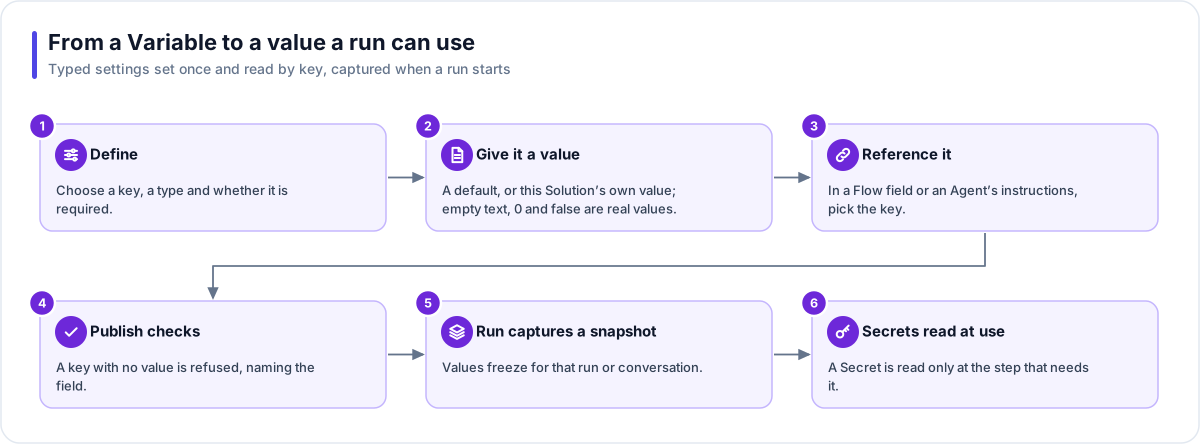
- Define. Open the Solution's Variables tab, choose a key and a type, and mark it required if nothing should run without it.
- Give it a value. Set a default or this Solution's own value. Empty text, 0 and false are real values, not "unset".
- Reference it. In a Flow field or an Agent's instructions, pick the key from the Variables group. An Agent reads only the keys ticked on it.
- Publish checks. Publishing checks every reference. A key with no value is refused, naming the field.
- Run captures a snapshot. A run or a conversation captures its values once. A later edit reaches the next run, never the current one.
- Secrets read at use. A Secret is read only at the step that needs it, so replacing or revoking one takes effect at its next use, even in a running workflow.
Where a value comes from
| State | Meaning |
|---|---|
| Not set | No default and no value for this Solution |
| Default | The default applies |
| This Solution | This Solution's own value applies |
| Needs a value | Required and not set: Flows cannot be switched on |
Clearing this Solution's value falls back to the default. Clearing is refused if a published Flow or Agent would be left without a value.
Secrets
| Rule | What it means |
|---|---|
| Typed once, never shown | While you type a secret, the box is masked and an eye button shows what you have typed so far. After saving, the value reads Set, with where it is stored and when. There is no stand-in for the stored value and no way to reveal it, because no call returns it. |
| Two places only | A Secret can go in an HTTP request header or an application action input. Messages, emails, web addresses, bodies and Agent instructions are refused. |
| Read at the moment of use | Other values freeze when a run starts; a Secret is read at the step that needs it. |
| Where it is stored | Set by the deployment, not the workspace: Flexday AI's encrypted storage with the workspace's own key by default, or AWS Secrets Manager or Azure Key Vault where the deployment is set to use one. There is no setting for it in the Studio. |
| Never copied | Publishing, cloning, export and import carry a Secret's key, type and label only. |
Important
Text, Number, True / false and JSON values are plain text. They can appear in messages, prompts and run history, and they travel in exports. Put a single token in a Secret, and a whole authenticated service in a Connection.
Works with
- Flow: any field that accepts an expression can read a Variable. New Flows have Variables switched on.
- Agent: instructions can read the keys ticked on the Agent. Greetings and tool descriptions stay literal. An Agent can never read a Secret.
- Integration and HTTP request steps: the only places a Secret can be used.
- Template: carries definitions and non-secret defaults; each new Solution supplies its own values and Secrets.
- Builder: reads keys and whether they have a value, never the values, and can propose new Variables for you to confirm.
Governance and limits
| Area | What applies |
|---|---|
| Boundary | Every Variable belongs to exactly one Solution or Template. Two Solutions with the same key are independent. |
| Access | Anyone who can edit a Solution or Template can define and set its Variables; viewers can read but not change them. |
| Revisions | Every edit raises a revision, so two people saving at once get one success and one clear conflict. A Variable cannot be deleted while anything still uses it. |
| Safety | A Secret is never returned, logged, put in a prompt or exported. |
| Limits | 200 Variables per Solution or Template. Keys up to 64 characters, labels 120 and descriptions 1,000 characters. One value up to 32 KiB, nested up to 20 levels. One Secret up to 8 KiB. |