Components
Doc Base
A searchable collection of documents that answers questions by keyword and by meaning, with citations and per-document access control.
- Everyone
- Technical
Last reviewed
A Doc Base is a Solution's library: policies, manuals, contracts, knowledge articles, web pages. Add files or point it at a site, and each document is prepared for search. People and Agents can then ask questions by keyword, by meaning, or both, and an Agent's answer can cite the documents it matches.
Note
In one sentence: a Doc Base is the document counterpart of a Fact Base: it turns files into searchable knowledge with citations, and decides per document who may see it.
Why it matters
- Answers people can check. Citations name the retrieved documents whose names, numbers and terms the answer repeats, worked out by the platform rather than claimed by the model.
- Finds what people mean. Hybrid search combines exact words with meaning, so "time off for a new baby" finds the parental leave policy.
- The right people see the right documents. Audience tags decide which documents an end user's searches can retrieve, cite or preview, checked on every such search. Studio searches see every document, and so does an Agent whose Doc Base access is set to Full doc base.
- Keeps working when a provider does not. If the meaning half of search is unavailable, keyword search still answers.
Key concepts
| Term | What it means |
|---|---|
| Chunk | A passage of about 500 tokens by default, cut at a paragraph, line or sentence break and overlapping the next one. Each carries its document and the heading it falls under. |
| Embedding model and vector store | Chosen once per Doc Base. Changing either means re-indexing the whole collection. |
| Hybrid search | Keyword and meaning-based candidates, combined by rank. |
| Preset | Fast, Balanced (the default) or Thorough: bundles of retrieval settings. |
| Audience | A tag on a document that must match a tag the caller holds. A document with no tags is visible to anyone who can search. |
| Citation | The retrieved documents whose wording the answer shares, attributed by the platform rather than by the model. |
| Index generation | One build of the index under one configuration, recorded so you know which build holds each document. |
How it works
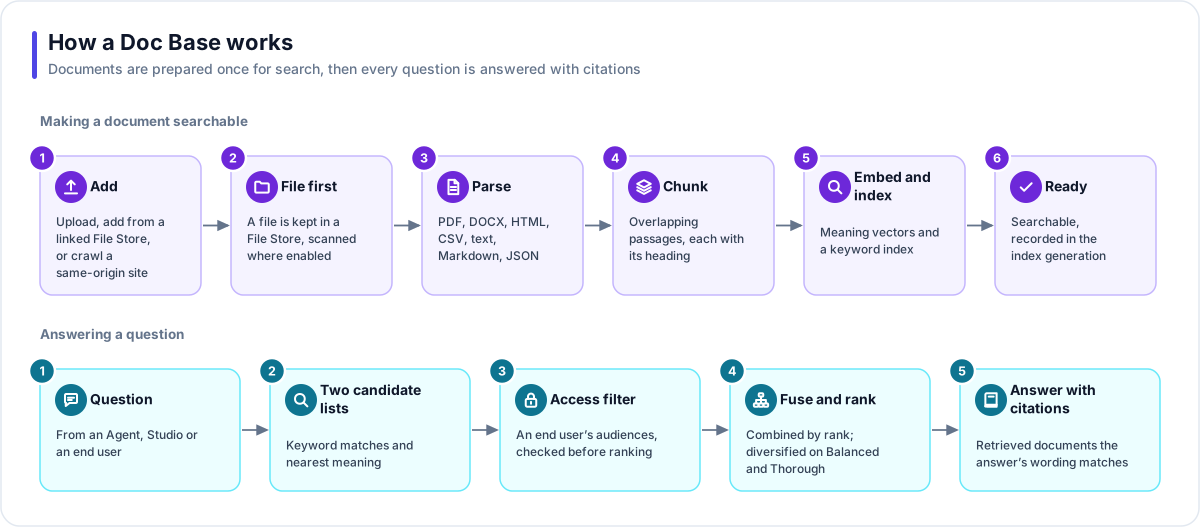
Making a document searchable
- Add. Upload from your device, add a file from a linked File Store (by hand, or automatically as new files arrive), or crawl a site on the same address.
- File first. An uploaded or added file is stored in a File Store: fingerprinted, typed from its content, size-checked and scanned for malware when your deployment has a scanner. A crawled site is fetched each time it is indexed and is not stored as a file.
- Parse. PDF, Word (DOCX), HTML, CSV, TSV, plain text, Markdown, JSON and JSON Lines are read. Text inside images is not extracted.
- Chunk. The text is cut into overlapping passages of about 500 tokens at paragraph, line or sentence breaks, and each passage keeps the heading it falls under.
- Embed and index. The chosen model turns each chunk into a meaning vector, and the text goes into a full-text keyword index.
- Ready. The document's chunks are replaced in one step and the document records which index generation holds them.
A document moves through Queued, Processing and Ready, or Error with a named reason. You can re-index one document (optionally with its own chunk size) or the whole Doc Base.
Answering a question
- Question. From an Agent, from Studio, or from an end user through the Flex Gateway. A preset picks the settings.
- Two candidate lists. Keyword search tries a strict match first, then any of the question's words. Meaning search finds the nearest chunks using the Doc Base's model.
- Access filter. For an end user, audience tags are checked inside both candidate searches and again when the passages are loaded, so a document they may not see never reaches ranking.
- Fuse and rank. The lists are combined by rank, with a relevance floor that loosens when needed, so a search that found candidates always returns some. On Balanced and Thorough (with the PostgreSQL vector store) the results are then diversified so near-duplicates do not crowd out other sources.
- Answer with citations. The top passages with their documents.
Settings that shape retrieval
| Setting | Options |
|---|---|
| Search mode | Keyword (exact words and phrases), Semantic (meaning), Hybrid (both; the default) |
| Preset | Fast (fewest candidates, no diversification), Balanced (the everyday setting), Thorough (widest net) |
| Embedding models | Voyage AI, OpenAI or Azure OpenAI embedding models, where your deployment offers them |
| Vector store | PostgreSQL (the default) or Qdrant |
Where you work with it
Doc Bases are listed under Data Studio → Doc Bases. The Files view is organised as Stores → Folders → Files: the Doc Base's own store plus any File Stores you link. Add to index puts a file into the collection. A link can also be set to index new files automatically, which is how an app's uploads can make themselves searchable. Linking a store never indexes anything by itself.
Works with
- File Store: every uploaded or added document is a reference to a file; the bytes stay in the store and cannot be permanently deleted while a document points at them. A crawled site has no file.
- Agent: searches through a Doc Base search grant, and its citations flow into answers.
- Flex Gateway: end users reach it through an agent endpoint; their audiences come from sign-in claims and assigned tags.
- Builder: adds documents while it builds, and can make an app's uploads index themselves.
Governance and limits
| Area | What applies |
|---|---|
| Boundary | Owned by one Solution (or one Template). Its own File Store cannot be renamed, deleted or unlinked separately. A crawl stays on the address it started from. |
| Access | Audience tags decide which documents an end user may retrieve, cite or preview. Studio users are trusted; end users are filtered by their claims and assigned tags, unless the Agent's Doc Base access is set to Full doc base, which ignores audiences. Tag edits apply on the next search with no re-indexing. |
| Versions | Index generations record every build. A whole-collection re-index rebuilds documents one at a time: each switches to the new build when its own indexing finishes, and one that fails shows Error without stopping the rest. |
| Safety | A file the malware scan rejects is never indexed or previewed, and nothing is previewed before its scan clears. Files added from a File Store wait for the scan before indexing; a file uploaded straight into the Doc Base is indexed while its scan runs. Previews are inert and recorded in the file access log. |
| Limits | Per-file size follows the File Store limit (100 MB by default). Uploads count against workspace storage. Embedding cost is visible per Doc Base. |