Evaluating Flexday AI
Running a proof of concept
A four-week plan for trying Flexday AI on one real process, with what you provide and what you get each week, and a template for success criteria.
- Everyone
- Functional users
Last reviewed
A proof of concept should answer one question with evidence: can Flexday AI run one of your real processes well enough, and under enough control, to adopt it? This page sets out four weeks of work after a week of preparation. Each week ends with something your team can open and check in its own workspace, and the decision at the end is made against success criteria you agreed before you started. The worked example throughout is the Service Desk Copilot, an IT service desk Solution with a Teams assistant, a dashboard and ServiceNow integration.
At a glance
- One process, one owner. Pick a process with a clear owner and a small group of people who will use what is built.
- Criteria first. Agree what success looks like, and how you will measure it, before week 1.
- Build, connect, govern, decide. One week each, in that order.
- Your evidence, not a demonstration. By week 4 the Solution, its sign-in, its evaluation results, its version history and its usage and cost figures are all in your own workspace.
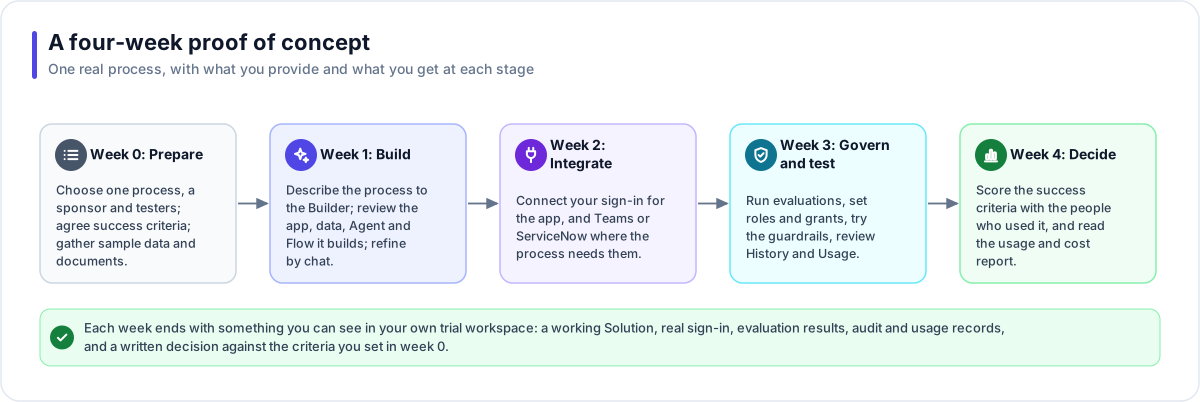
Week 0: prepare
| You provide | You get |
|---|---|
| One process and its owner, who acts as sponsor, and three to ten people who will try what is built | A shared understanding of scope: one Solution, not a platform rollout |
| Sample data (CSV or JSON exports, or a database schema; save an Excel workbook as CSV first) and a handful of real documents, with your decision on whether real or test data may be used | A plan for which data goes into the trial, and where it is held (see Data protection and privacy) |
| The success criteria, using the template below | Criteria every later week is measured against |
| Who signs in: your identity provider for the people who build, and for the people who use the result | The sign-in settings for the workspace and for the Solution's app (see Identity and access) |
| Your due-diligence requests, from the checklist | Time to read the answers while the trial runs, rather than after it |
Ask Flexday to set up the workspace for the trial. Staff create a workspace together with its sign-in and its first owner, and the owner then invites everyone else.
Week 1: build by conversation
| You provide | You get |
|---|---|
| The process owner, describing the process to the Builder in plain English, with the sample files attached | A working Solution: usually a web app, plus the datasets, document collections, Flows and Agents the request needs |
| Review sessions: the testers open the draft app and say what is wrong or missing | Changes made by conversation, each one visible in the preview before it is deployed |
| A short written brief of what "done" means for this process | The brief pinned to the Solution, so every later Builder turn reads it |
At the end of the week, check what the Builder declared as not yet real. The Solution's overview lists anything it built as a placeholder under Not built for real yet, so nothing simulated is mistaken for a finished part. See How a Solution comes together.
Week 2: integrate
| You provide | You get |
|---|---|
| Your identity provider's details (OpenID Connect or SAML), or a Microsoft Entra ID tenant | Real sign-in on the Solution's app and API, through an Identity attached to its gateway |
| For Teams: an administrator who can approve and publish a Teams app in your organisation | The Agent available in Microsoft Teams as a Bot |
| For ServiceNow: a non-production instance and an integration account (OAuth client credentials or a user and password) | A Flow step that creates tickets through the Integration step, with a Connection that holds the credential |
Integrations are optional. Connect only what the process needs; a proof of concept that uses one integration well says more than one that touches four.
Week 3: govern and test
| You provide | You get |
|---|---|
| Ten to twenty real questions for each Agent, with the answer you expect | An evaluation set run against the real engine, with a pass or fail per case, which you can require before each new version is published |
| The people who should and should not see the Solution, and their roles | Workspace roles and Solution grants set for them, checked by each person signing in |
| Topics the Agent must refuse or report, and your rules for personal data | Guardrails configured and tried in the Playground, including a blocked topic and personal-data handling |
| A reviewer from security or risk | A walk through the evidence: each resource's Versions and History, the Usage figures, a File Store's Access log and the support-access setting |
Each governance page has a What an evaluator can verify section, which says where in the Studio to look. Start with Identity and access and AI safety.
Week 4: decide
| You provide | You get |
|---|---|
| The testers, scoring each success criterion | A scored criteria table, with the evidence for each score |
| The sponsor and the reviewers, in one decision meeting | The usage and cost report: the workspace's Usage page (cost by Solution, model and service) and each Solution's own Usage view, both exportable as CSV, and each Agent's Analytics |
| Your list of open due-diligence items | A written decision: adopt, extend the trial, or stop, with the reasons |
Success criteria template
Agree each row before week 1. "How to measure" should point at something the trial itself produces, so the score is evidence rather than an impression.
| Criterion | Measure | Target you set | How to measure in the trial | Service Desk Copilot example |
|---|---|---|---|---|
| Answers are right | Share of evaluation cases that pass | Your threshold | The Agent's Evals results | At least 18 of 20 IT questions answered correctly, with the article cited |
| Answers are grounded | Share of answers that cite a source | Your threshold | Citations shown with each answer, and the Agent's Analytics (sources cited) | Every policy answer names the knowledge article it came from |
| Work leaves the conversation complete | Share of records created with every required field | Your threshold | The created records in your system of record | Tickets raised from Teams arrive with site, category and the steps already tried |
| People use it | Conversations and distinct people per week | Your threshold | The Agent's Analytics | Half of the pilot group asks at least one question a week |
| It stays within policy | Blocked or flagged conversations handled as intended | No unhandled case | Guardrail events in Analytics, and the conversations behind them | A request for someone else's password is refused every time |
| Access is right | People see exactly what their role allows | No exceptions | Each tester signs in and checks; the Solution's People view | Analysts can edit the dashboard; other staff can only use the assistant |
| Cost is known | Model cost per week, and per conversation | Within your budget | The Usage page and its CSV export | Cost per week for the Solution, read from its Usage view |
| It can be changed safely | A change made, tested and published without disruption | One change through the cycle | The resource's Versions list | A new blocked topic added, evaluated and published in one day |