Components
Interactive cards
Show a document or collect a validated form inside a conversation, the same way in Studio and in a generated app.
Written for
- Everyone
- Technical
Last reviewed
Interactive cards let a conversation do more than talk. A document card shows a file in a built-in reader, with a Download button when policy allows. A form card collects several validated values, including files, and asks again field by field until the answers are right. Cards appear the same way in Studio and in a generated app.
Note
In one sentence: cards are behaviour, not resources: you switch them on in an Agent, or add Form and ViewPort steps to a Flow.
Why it matters
- Fewer back-and-forth messages. One form gathers everything a request needs, with the rules checked before anything happens.
- Documents in context. People read the policy or the contract inside the conversation that mentions it.
- A card is not a key. Every view, download and submission is authorised again, so a copied card grants nothing.
- Safe to show. Previews are built on the server and are inert, and downloads always leave as attachments.
Key concepts
| Term | What it means |
|---|---|
| Card | A document or a form. It carries a card ID plus a file reference or a form specification, never bytes, a web address or a key. |
| Present | A File Store permission separate from read, with a download policy: always, signed-in people only, or never. The store's stricter setting wins. |
| Form specification | Fields, per-field rules, layout and a confirmation message. Collected as one card, or one question at a time in chat. |
| Re-ask | An invalid submission returns the same form with per-field errors, at no cost, up to 5 times. |
| Submission record | An optional, separately stored copy of the answers. Off does not mean temporary: the answers stay in the conversation. |
| Reader | A server-built, inert preview. "We can't show this here" is a real answer, with Download offered instead. |
How it works
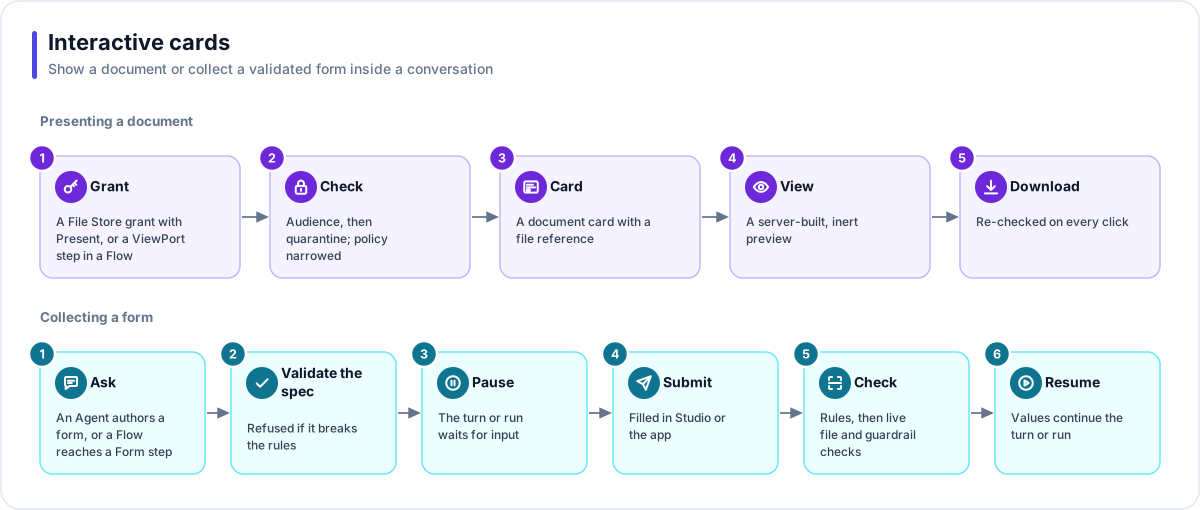
Presenting a document
- Grant. The Agent's File Store grant carries Present, with a download policy. A Flow uses a ViewPort step instead.
- Check. The audience check runs, then the quarantine check, and the policy is narrowed against the store's own.
- Card. A document card with a file reference is attached to the reply (at most 5 per turn) and saved with it.
- View. The reader shows a preview built on the server: text, table rows, a PDF or an image.
- Download. Re-authorised on every click. If the audience is revoked or the file is quarantined, the next attempt answers "not found".
Collecting a form
- Ask. The Agent writes a form, or a Flow reaches a Form step.
- Validate the specification. A form is refused if it has no inputs, names an upload store it may not use, or asks for something the Agent's own personal-data guardrail would block.
- Pause. The Agent's turn waits for input; a Flow run parks without holding a worker.
- Submit. The person fills in the card. A file field uploads through a gateway file endpoint bound to that store.
- Check. Field rules first, then live checks: the file is looked up again in its store, with its audience, scan verdict, size and type, then the guardrails.
- Resume. The values continue the turn or the run. A confirmation replaces the form, and an optional record is stored.
Fields, rules and layout
| Area | What is available |
|---|---|
| Field types (14) | Text, text area, number, email, phone, web address, date, time, date and time, select, multi-select, checkbox, file, and information (display only). |
| Rules | A closed list, never free-form patterns: named formats (digits, letters, alphanumeric, slug, hex, UUID, no spaces, US postal code), starts with, ends with, contains, allowed and blocked email domains, minimum and maximum length or value, working days and hours. A rule the field type cannot enforce is refused when saved. |
| Layout | 1, 2 or 3 columns with a per-field width. Wide fields take a full row by default. Everything folds to one column on narrow screens. |
Works with
- Agent: three separate switches for forms (show forms, which stores may receive uploads, keep a record); presenting needs a File Store grant with Present. The sentence beside a card is optional per Agent.
- Flow: Form and ViewPort steps, with a timeout branch.
- File Store: the bytes, audiences, quarantine, quota and default download policy.
- Flex Gateway: the agent or flow endpoint carries the card; only a form's file field needs a file endpoint.
- LaunchPad and Studio: two renderers over one contract. A Bot in Teams shows text only, so an Agent that uses forms cannot go live on a Bot.
Governance and limits
| Area | What applies |
|---|---|
| Boundary | Stores and files must be in the same Solution. A Flow run with no one to show it to (a schedule, a webhook) cannot show a card. |
| Access | A card grants nothing: its ID is a lookup key and every view, download and submission re-authorises. A refused file answers "not found" before any other reason. |
| Versions | A policy may narrow a store's default but never widen it. Existing apps keep their card renderer until it is refreshed. |
| Safety | No document parser runs in the browser. Bytes leave as an attachment with a neutral type. Submitted values are data, never code, and are marked untrusted for the model. |
| Limits | 5 cards per turn; 40 fields per form, 100 options per select, 10 files per file field, 5 re-asks. Previews up to 25 MB for a PDF and 10 MB for an image. A Flow form waits 60 seconds to 7 days, 24 hours by default. |
Related
- Apps and experiences
- AI safety
- Glossary: Interactive card, Present