Use cases › Service Desk Copilot
Solution design
Every resource in the Service Desk Copilot Solution, how each is configured, and why it is set up that way.
- Technical
Last reviewed
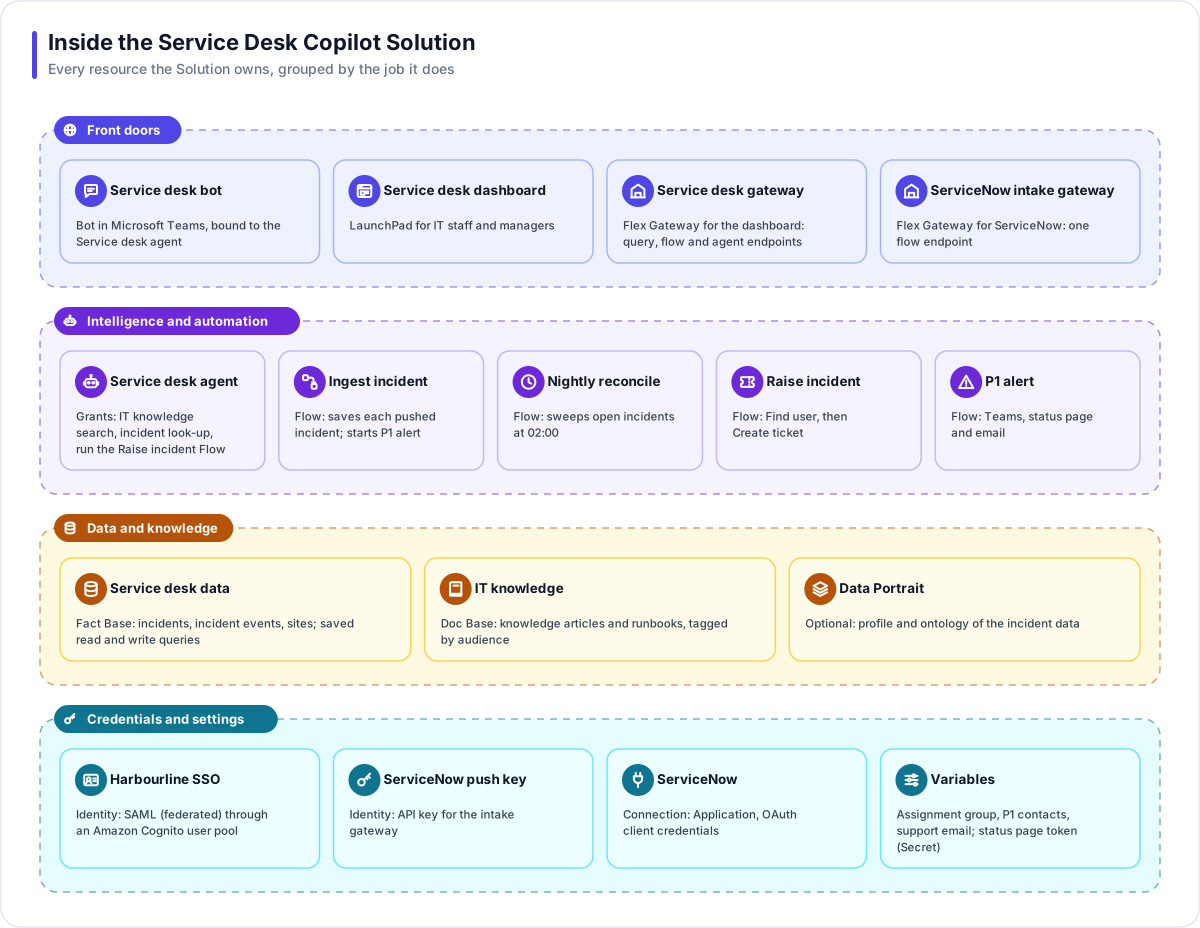
The Service Desk Copilot is one Solution. Everything below lives inside it, so everything can reference everything else, and nothing outside it can reach in. This page lists each resource, how it is configured and why.
Note
Resource names follow the platform's convention of a short name and a type suffix. The Builder would name the Fact Base Service Desk DS and the app Service Desk APP; this page uses plain names for readability.
Data and knowledge
Service desk data (Fact Base)
Created by the Builder from a sample ServiceNow incident export (CSV).
| Table | Purpose |
|---|---|
| incidents | One row per incident: ServiceNow record ID (the key), number, short description, priority, state, category, assignment group, site, opened and updated times |
| incident_events | One row per change pushed from ServiceNow: incident, state, priority, time |
| sites | Harbourline's sites, for grouping and the dashboard map |
| Saved query | Kind | Used by |
|---|---|---|
| open_incidents_by_priority | Read | Dashboard |
| sla_at_risk (minutes from the SLA_WARNING_MINUTES Variable) | Read | Dashboard |
| incidents_by_site | Read | Dashboard map |
| incident_status (by number) | Read | The Agent: state, assignment group, last update and short description only |
| upsert_incident | Write: insert, or update the row when the record ID already exists | Ingest incident, Nightly reconcile |
| add_incident_event | Write | Ingest incident |
The read queries run under the Fact Base's reader role. The write queries run under the writer role, and only the two Flows use them; no gateway endpoint exposes a write query directly.
IT knowledge (Doc Base)
| Setting | Value |
|---|---|
| Content | Knowledge articles exported from ServiceNow, plus IT runbooks |
| Audiences | Knowledge articles carry no tag (anyone who can search may see them). Runbooks carry the it-staff tag. |
| Linked File Store | A "Knowledge exports" store, linked with automatic indexing so a new export indexes itself |
| Search | Hybrid, Balanced preset |
Data Portrait (optional)
Harbourline profiles the incident data once it has a few weeks of history. The profile flags, for example, that most incidents arrive without a site, which led to the Agent asking for it.
Intelligence and automation
Service desk agent (Agent)
| Setting | Value |
|---|---|
| Model | The workspace default (Claude) |
| Grounding | Answer only from connected knowledge on |
| Grants | Doc Base search on IT knowledge; Fact Base query on Service desk data (reader role, incident_status only in its instructions); run Flow: Raise incident |
| Instructions | Try documented fixes first and cite them; before raising a ticket, collect the work email, site, device and what was tried, then confirm; report status only by ticket number; never ask for a password |
| Guardrails | Personal data masked (card numbers and similar); a blocked topic for requests to reset someone else's password or bypass security controls |
| Forms | Off, because the Agent answers in Teams, which shows text only |
| Evaluations | A golden set of 20 questions and ticket requests, required to pass before publishing |
Flows
| Flow | Trigger | Steps |
|---|---|---|
| Ingest incident | Manual (started through the intake gateway's flow endpoint) | Check fields → Run query upsert_incident → Run query add_incident_event → Condition: priority 1 and state New → Subflow P1 alert → Respond |
| Nightly reconcile | Schedule, 02:00 Europe/London; published and enabled | Integration: Find tickets (open only, assignment group from a Variable, up to 100) → Loop → Run query upsert_incident → Send email summary |
| Raise incident | Manual (run by the Agent) | Integration: Find user (by email) → Integration: Create ticket (caller, summary, description, category, assignment group) → Respond with number and link |
| P1 alert | Manual (run as a subflow) | Loop over on-call conversations → Send channel message; HTTP request to the status page; Send email to P1 contacts; Respond |
The ServiceNow Connection names a duplicate-prevention field, so an interrupted Create ticket can be checked rather than risk a duplicate.
Front doors
| Resource | Configuration |
|---|---|
| Service desk bot (Bot) | Microsoft Teams, managed registration, bound to the Service desk agent; published to Harbourline's Teams catalogue |
| Service desk dashboard (LaunchPad) | Widgets: open incidents by priority, SLA at risk, a site map, a table of recent changes, and a chat panel on the Service desk agent |
| Service desk gateway (Flex Gateway) | Identity: Harbourline SSO. Endpoints: the three dashboard read queries, and an agent endpoint for the chat panel. All inherit, so all require sign-in. |
| ServiceNow intake gateway (Flex Gateway) | Identity: ServiceNow push key. One flow endpoint that starts Ingest incident. |
Two gateways keep two very different callers apart: people signing in through SAML, and one machine presenting an API key. Each gateway has exactly the endpoints its caller needs.
Credentials and settings
| Resource | Configuration |
|---|---|
| Harbourline SSO (Identity) | SAML (federated) through an Amazon Cognito user pool; rule: email domain harbourline.example. See Authentication. |
| ServiceNow push key (Identity) | API key. The key is shown once and stored in ServiceNow; it can be revoked at once. |
| ServiceNow (Connection) | Kind Application, ServiceNow, OAuth client credentials; instance address; duplicate-prevention field |
| Variable | Type | Purpose |
|---|---|---|
| SERVICENOW_ASSIGNMENT_GROUP | Text | The group new tickets go to, and the reconcile filter |
| SUPPORT_EMAIL | Text | Where the nightly summary goes |
| SLA_WARNING_MINUTES | Number | How close to breach counts as "at risk" |
| P1_NOTIFY_EMAILS | JSON | Managers to email about a P1 |
| P1_ONCALL_CONVERSATIONS | JSON | Teams conversations of on-call engineers, copied from the Bot's Conversations view |
| STATUSPAGE_TOKEN | Secret | The status page API token, used only in the HTTP request's Authorization header |
Why it is designed this way
| Decision | Reason |
|---|---|
| ServiceNow stays the system of record | Analysts keep their tools; Flexday AI never becomes a second place to work tickets. |
| Writes only through Flows | Every write to the Fact Base is visible in a graph with a step trail, under the writer role. |
| The Agent raises tickets through a Flow | The Agent cannot call ServiceNow directly; the Flow fixes the application, the credential and the fields. |
| Status by ticket number only | Teams identifies people by their Microsoft account, not by email, so the Agent returns only fields any employee may see. |
Runbooks tagged it-staff | Teams users see public articles; IT staff see runbooks in the dashboard's chat, where their sign-in carries the tag. |