Components
Components overview
How the building blocks of Flexday AI fit together, with a one-line guide to every component and a link to its page.
- Everyone
Last reviewed
Flexday AI is built from a small set of components. Two are containers that hold everything else, most are resources you create inside a Solution, and a few are the surfaces people use to reach them. This page shows how they fit together and links to a page for each one.
At a glance
- A Workspace is your organisation's own space. It holds your members, your settings and any number of Solutions. Nothing crosses between workspaces unless you move it with an export, apart from the read-only catalog Templates Flexday AI publishes for everyone.
- A Solution is the container for one thing you are building. Every other resource belongs to exactly one Solution (or one Template) and may reference only what is inside it.
- A Template is a reusable, working copy of a Solution. Using one copies real resources into a new Solution in the background, with no AI build in between.
- A whole Solution can be exported to one bundle file and imported again as a brand-new Solution. Credentials and secrets never travel.
- Governance is part of every component, not an add-on. Each component page ends with the boundary, access, versions, safety and limits that apply to it.
The resource model
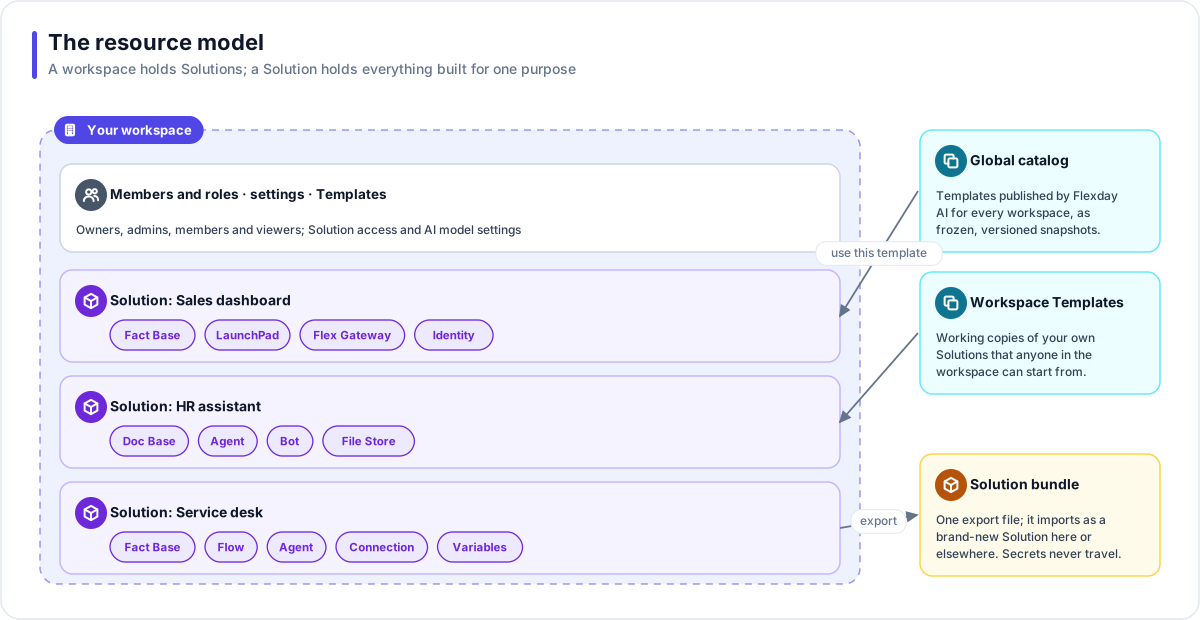
Workspace to Solutions. A workspace owns its members and their roles, its plan and quotas, and its settings. It can hold any number of Solutions. Who may see each Solution is decided by the workspace's roles and, where the workspace restricts it, by each Solution's own list of people.
Solution to resources. You create each resource inside a Solution. A Solution can own LaunchPads, Fact Bases (each with none or one Data Portrait), Doc Bases, File Stores, Flows, Agents, Flex Gateways with their endpoints, Identities, Connections, Variables and Bots. The Studio's lists (for example Data Studio, Fact Bases) show resources across every Solution you can see, but each resource still belongs to exactly one.
How resources connect. Inside a Solution, resources work together:
- A LaunchPad reads data only through the Solution's Flex Gateway, and may query only the Fact Bases connected to it.
- Flows and Agents compose in both directions: a Flow can run an Agent, and an Agent can run a Flow.
- Doc Bases keep their document bytes in File Stores.
- Connections and Variables lend credentials and settings to Flows and Agents only while they run.
- A Bot makes one published Agent available in Microsoft Teams.
A reference that crosses into another Solution is refused when it runs, not just hidden from a list.
Templates. A workspace Template is published from one of your own Solutions and is visible to every member of the workspace. The global catalog holds Templates that Flexday AI publishes for every workspace, each release a frozen, read-only snapshot. Use this template copies either kind into a new Solution: apps arrive in draft, Flows and Agents arrive unpublished and credentials arrive blank.
Export and import. A Solution exports to one bundle that carries every resource it owns and the data you choose. An import always creates a new Solution; it never merges into or overwrites one.
Every component
Containers
| Component | What it is |
|---|---|
| Workspace | Your organisation's own space: members, roles, settings, Solutions and Templates, kept apart from every other workspace. |
| Solution | The container for everything built for one purpose; everything inside references only what is inside. |
Data and knowledge
| Component | What it is |
|---|---|
| Fact Base | A queryable dataset with its own live PostgreSQL schema, a business definition and saved queries. |
| Data Portrait | An optional measured profile and signed-off business ontology on top of a Fact Base. |
| Doc Base | A searchable collection of documents with keyword, semantic and hybrid search and citations. |
| File Store | Governed file storage with folders, immutable versions, audience tags, malware scanning where your deployment has a scanner, and retention. |
Apps and experiences
| Component | What it is |
|---|---|
| LaunchPad | A generated web app with a safe Draft, numbered versions and one live version. |
| Interactive cards | Documents and forms shown inside a conversation, in Studio or in a generated app. |
| Bot | One published Agent made available in Microsoft Teams. |
| Platform surfaces | Studio, Apps, Flex Gateway and the Admin Console: where people meet Flexday AI. |
Automation and AI
| Component | What it is |
|---|---|
| Flow | A visual workflow, run as a durable background job and recorded step by step. |
| Integration | A Flow step that performs one typed action in a business application; today that application is ServiceNow. |
| Agent | A conversational AI assistant you configure: instructions, a model, tool grants, guardrails and budgets. |
| The Builder | The AI engine that turns a plain-English request into a working Solution and refines it as you chat. |
API and access
| Component | What it is |
|---|---|
| Flex Gateway | A Solution's public API, with query, flow, agent and file endpoints. |
| Identity | The sign-in or credential set a Flex Gateway checks callers against. |
| Connection | Encrypted credentials for an outside system, decrypted only when a Flow step, an Agent tool or a test send uses them. |
| Variable | A named, typed setting, including secrets, read by key from Flows and Agents. |
Reuse
| Component | What it is |
|---|---|
| Template | A reusable, working copy of a Solution that new Solutions start from. |
How to read a component page
Every component page follows the same shape, so you can stop reading at the depth you need:
| Section | What you get |
|---|---|
| Lead and In one sentence | What the component is, in plain words. |
| Why it matters | The business value and the risk it reduces, for a functional user. |
| Key concepts | The handful of terms you need, each defined once. |
| How it works | A diagram and numbered steps that match it. |
| Works with | The other components it connects to. |
| Governance and limits | The boundary, access, versions, safety and limits that apply. |
| Related | Capability, governance and glossary pages to read next. |
The diagrams share one colour scheme: violet for Solution resources, indigo for platform surfaces, cyan for platform services and controls, amber for data stores, slate for people and outside systems, and green, amber and red for lifecycle states.
Tip
New to Flexday AI? Read Solution first. Almost everything else is a resource inside one.