Governance
File safety
How Flexday AI checks, scans, stores and serves files - nothing quarantined is handed out, every download is an attachment, and reads are logged.
- Technical
Last reviewed
Generated apps accept uploads from people nobody has vetted, and Agents and Flows move files between systems. Flexday AI treats every file as untrusted. A file is checked when it arrives, can be scanned before anyone downloads it, is served in a way a browser cannot execute, and its reads are recorded.
At a glance
- Checked on arrival. The server decides the type, from the content where the format has a reliable signature and otherwise from the name; size, type rules and quota are applied per store.
- Scanned before it is served, where switched on. With a scanner configured, nothing is handed out while its scan is pending, infected or failed.
- Always a download. Files leave as attachments with a safe content type, so a browser never runs them.
- Access checked on every read. Audience tags and the scan verdict are checked each time a file is read through Flexday AI; a direct download link is checked when it is issued.
- Reads logged. The access log answers who downloaded or previewed a file and which links were issued.
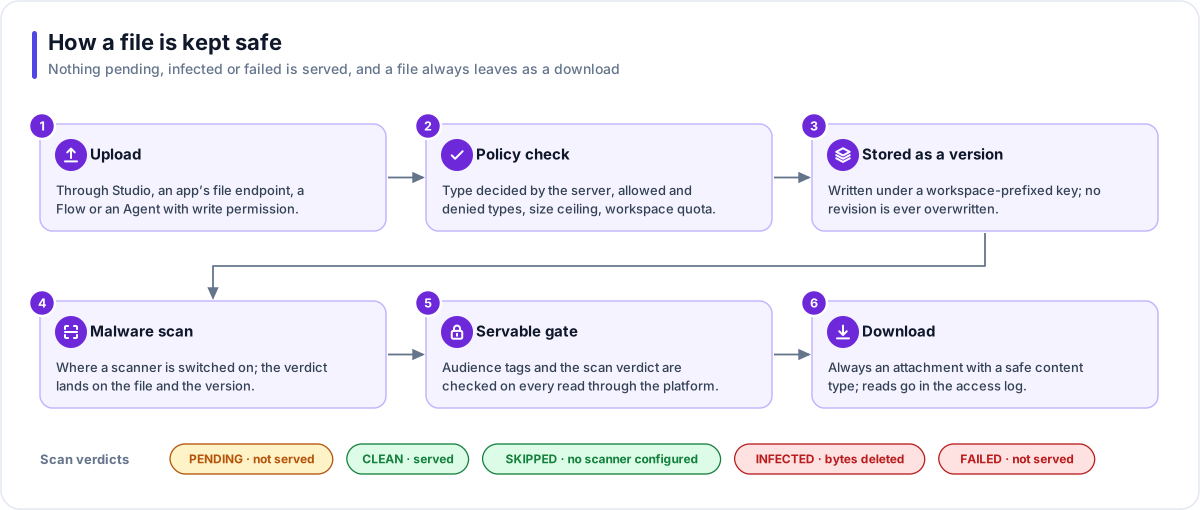
Checks on arrival
| Check | What happens |
|---|---|
| Content type | Decided by the server: from the content where the format has a reliable signature, otherwise from the file name. Executable and unknown types are always served as a generic binary download. |
| Store policy | Allowed and denied types, maximum size (which can only lower the platform ceiling), and whether scanning is required, which refuses uploads while no scanner is set up. |
| Quota | The workspace's storage quota is checked on every upload, including new versions. |
| Fingerprint | Every file is hashed, and identical bytes do not create a new version. A direct upload is accepted only after the server re-reads it: the size must match, and the type is decided again and checked against the store's rules. |
| Anonymous uploads | A store can refuse anonymous uploads from apps altogether. |
Malware scanning
Connectors for Amazon GuardDuty Malware Protection for S3 and Microsoft Defender for Storage are built in, and a deployment switches one on. Scanning is off by default, and the infrastructure code for Flexday's AWS environments does not switch it on.
| Verdict | Served? | Notes |
|---|---|---|
| Pending | No | Every new file starts here. |
| Clean | Yes | The scanner found nothing. |
| Skipped | Yes | No scanner is configured, or the scanner does not scan that type of file. |
| Infected | No | The bytes are deleted first, then the verdict is recorded; the record is kept. |
| Failed | No | The scan could not complete. |
Every path that writes a file (an app upload, a Flow step, an Agent, a Doc Base) waits, for a bounded time, for its own verdict before using the file. A Doc Base can index a directly uploaded document whose scan is still pending, but never one found infected or failed. The read path never relaxes the rule.
Serving files
| Rule | Why |
|---|---|
| Always an attachment | The browser saves the file instead of opening it on the apps address, where it could otherwise act as a page. |
| Safe content type | Executables and unknown types are served as a generic binary download. |
| No content sniffing | A header tells the browser not to guess the type from the content. |
| Short-lived links | Direct upload links last 5 minutes and download links 15 minutes, each for one file. |
| Re-checked on use | A file reference in a Flow, an Agent tool or a card grants nothing by itself; access, audience and quarantine are checked on the live file every time. |
| Not found, not forbidden | A file a person may not see answers "not found", so its existence is not revealed. |
Previews
Document previews (in a document card or a cited source) are built on the server and are inert: text is shown as text, Word documents as their plain text, and formats that could carry active content, such as SVG and older Office formats, are refused by name. There are size limits on both the source and the expanded content. When a preview is not possible, the answer is "we can't show this here", with a download offered if policy allows.
Access and retention
- Audiences. Up to 32 audience tags per file. Studio users are trusted; end users are filtered by their sign-in claims and assigned tags.
- Access log. Every download and preview, and every direct link when it is issued, is recorded with who read it and through what (the Studio, an app, a Flow or an Agent); listings are recorded at most once a minute per person and store. It can be filtered by file, operation, source, caller and date, and it ages out after the workspace's retention window (30 days by default). Logging never delays a download.
- Retention. If a store sets a retention window, its deleted files are removed for good after it; if it sets a version limit, older versions lose their bytes but keep their history. Neither is set by default, so until then deleted files and old versions are kept. A file still used by a document is skipped, never forced.
- Quota. Storage is measured per workspace, shared with Fact Base data. A soft delete frees nothing until the retention sweep removes the bytes.
What an evaluator can verify
| To confirm | Where to look in a trial |
|---|---|
| That files are checked before they are served | A File Store's Files tab: the Verdict column shows Clean, Not scanned, Scanning, Infected or Scan failed, and a file that cannot be served has its download disabled. Settings shows whether the store requires malware scanning. |
| That downloads cannot run in a browser | Download a file through an app and inspect the response: it is an attachment, with content sniffing switched off. |
| Who read which file | The File Store's Access log tab: when, the action, the file, the caller, how they came, the bytes and the address, with filters. |
| How long files are kept | The File Store's Settings: Versions kept and Retention (days) for deleted files. |