Architecture
AI models
Which AI models Flexday AI uses, how the model for each task is chosen, and how every call is streamed and metered.
- Everyone
Last reviewed
Flexday AI uses AI models for several different jobs: building Solutions, answering in Agent conversations, inferring what data means, profiling it, and turning documents into searchable meaning. They do not all want the same model. Every call goes through one layer that picks the model, streams the answer and records what it cost.
At a glance
- Claude by default. Anthropic Claude Opus 5.5 is the platform default for most tasks. The Builder always runs on Claude.
- Azure GPT where configured. Azure AI Foundry GPT models are available for Agents and other tasks where a deployment offers them.
- Your choice per task. Workspace owners and admins can choose a model for each task; an Agent can choose its own.
- Every call is metered. Tokens and cost are recorded against the workspace and the Solution that caused them.
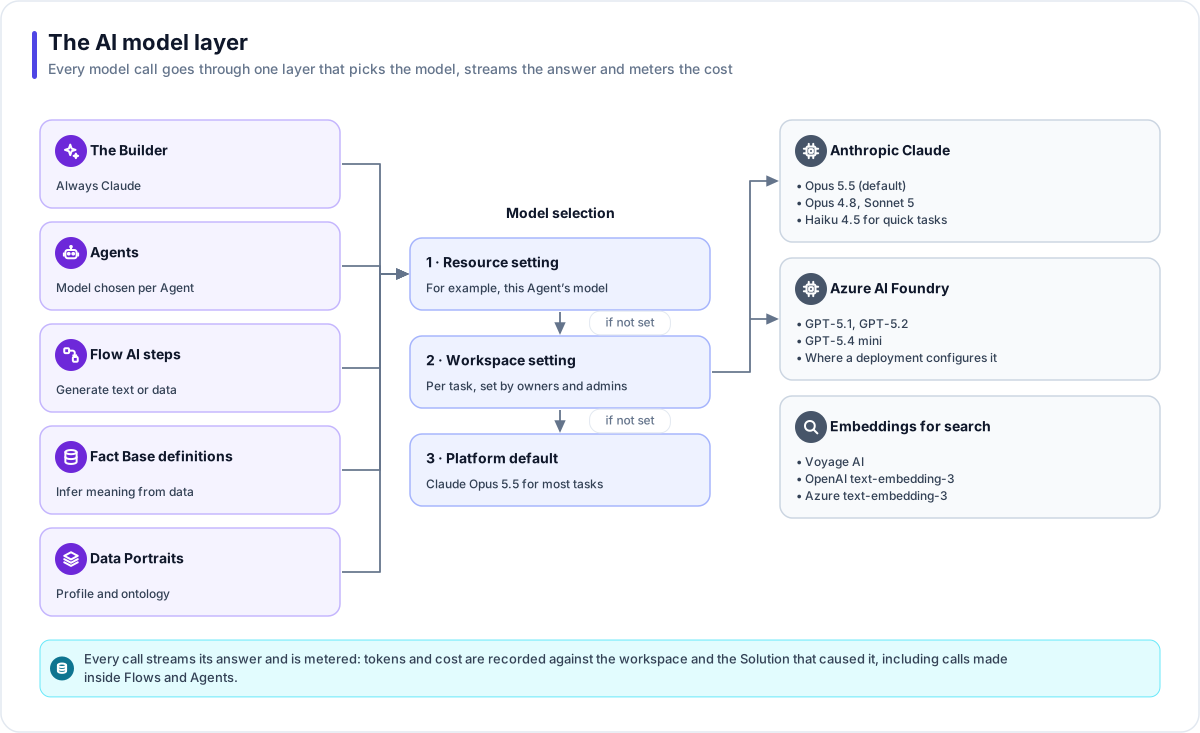
The models
| Provider | Models | Notes |
|---|---|---|
| Anthropic | Claude Opus 5.5 (default), Claude Opus 4.8, Claude Sonnet 5, Claude Haiku 4.5 | Haiku handles quick tasks such as routing, naming and classifying blocked topics. |
| Azure AI Foundry | GPT-5.1, GPT-5.2, GPT-5.4 mini | Where a deployment configures them. |
| Embeddings | Voyage AI (voyage-3.5, voyage-3.5-lite), OpenAI text-embedding-3 small and large, Azure text-embedding-3 small and large | Used by Doc Bases for meaning-based search. |
The tasks
| Task | What it runs |
|---|---|
| Builder | The Builder. Claude models only. |
| Agent | Agent conversations. |
| Evaluation judge | The model-scored rubric in Agent evaluations. |
| Definition | Inferring a Fact Base definition from sample data. |
| Profiling and ontology | The two stages of a Data Portrait. |
| Embedding | Turning Doc Base chunks and questions into vectors. |
How the model is chosen
The most specific setting wins:
- The resource's own setting. For example, the model named in an Agent's definition.
- The workspace's setting for that task. Owners and admins set this in Studio under the workspace's AI models settings; other members can see it. Flexday staff can also set it on a workspace's behalf, and the change is recorded against the person who made it.
- The platform default. Chosen deliberately, and moved forward as better models ship.
A Doc Base's embedding model is chosen once, when the Doc Base is created, because vectors from different models cannot be compared. Changing it means re-indexing the whole collection.
How calls behave
- Streaming. Answers stream back as they are generated, which is what lets large outputs complete reliably and lets Studio and apps show progress.
- Prompt caching. An Agent's stable instructions sit in a prefix the provider can cache between turns, which lowers cost and latency without changing behaviour.
- Metering. Every call records its tokens and, where a price is known, its cost. Calls made inside a Flow step, a nested Agent or a background job are attributed to the Solution they served. See Audit, usage and cost.
- Safety around the model. The model proposes and code checks: guardrails run before and after it, tools are limited to grants, and the Builder's work is checked by a deterministic finish gate. See AI safety.
Note
In a private-cloud deployment you use your own model-provider keys, held in your own secret store. See Deployment models.