Capabilities
Build by conversation
Describe what you need in plain English, attach files if useful, and the Builder creates a working Solution that you keep refining by chat.
- Everyone
Last reviewed
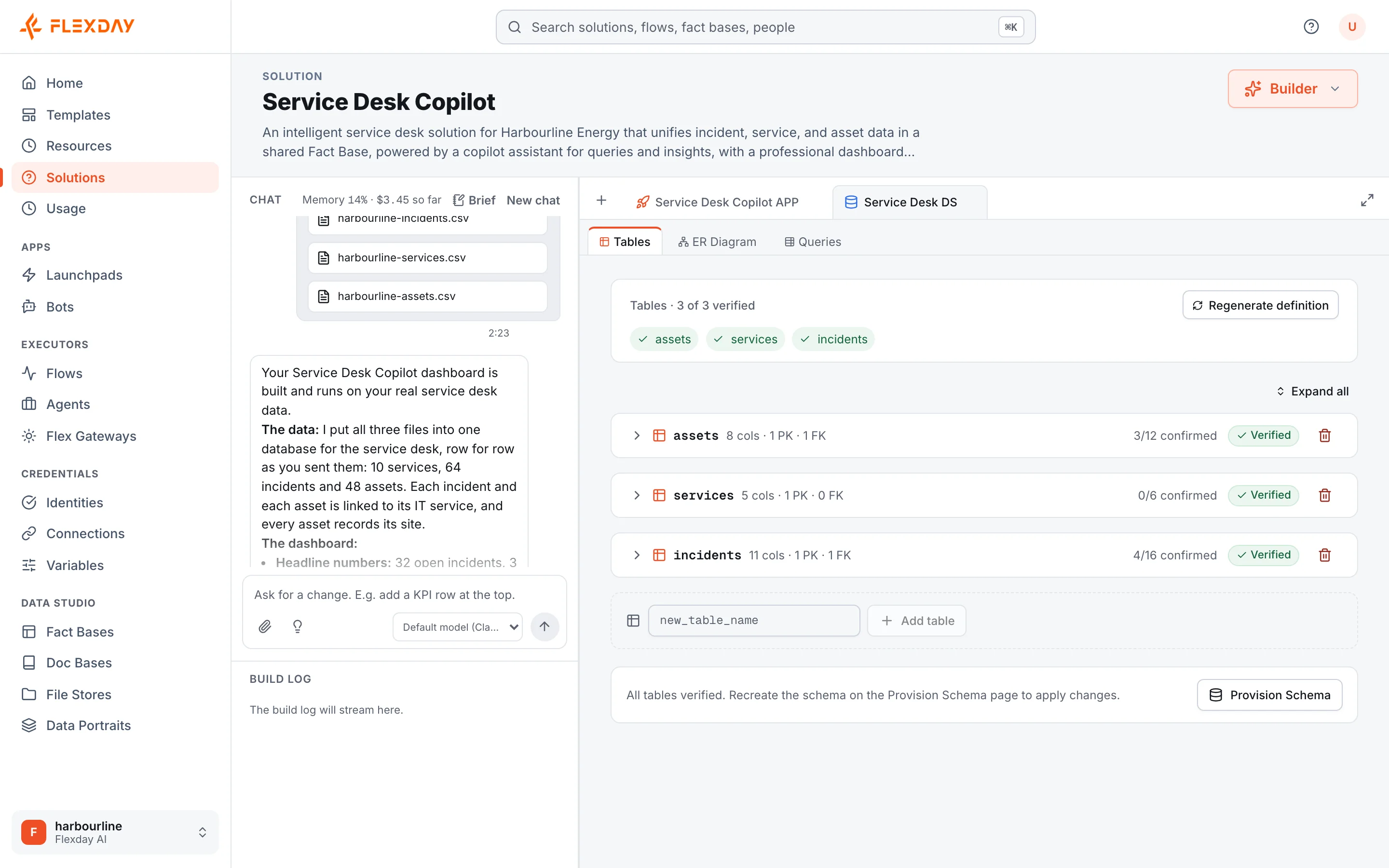
Type what you need in plain English, attach files if they help, and the Builder creates it: a dataset loaded with your data, a web app, saved queries, workflows, AI agents and the wiring between them. Then you keep talking, and it changes what it built. No development queue, no hand-off document, and every resource it creates can also be opened and edited by hand.
What you can do
- Go from an idea to a working app in one conversation. Describe the outcome ("a tracker for late deliveries with a map and a weekly summary email") and the Builder decides what to create inside a new Solution.
- Bring your own material. Attach up to 10 files per message: sample data, a spreadsheet exported as CSV, a design mock-up, a screenshot, a PDF specification. A JSON or CSV file is loaded exactly as you sent it. When you attach a design, the Builder is prompted to save its rules to its notes, which it reads on every later turn.
- Refine by chat. "Add a filter by region", "make that a line chart", "also email me a daily summary" all work as follow-ups.
- Set standing rules once. The Brief holds your non-negotiables (names, vocabulary, design rules) and is read on every turn, however long the conversation grows.
- Say what "done" means. Write a Done when list and the Builder checks each point against what it actually built, then shows you a Met, Not met or Can't verify table.
- Hold the build. Say "don't build yet" while you send more material; the platform blocks every change in that turn (the Builder may still save its notes), and it waits until you say "go ahead".
- Ask without changing anything. The Builder is instructed to answer questions about what exists without changing anything; say "don't build yet" when you need that guaranteed.
- Watch it work. A live preview of the app reloads on every file write, and a build log narrates every action.
- Know what is not real yet. The Builder declares anything that is still a placeholder, and the Solution's Overview shows the list to colleagues who never saw the chat.
How it works
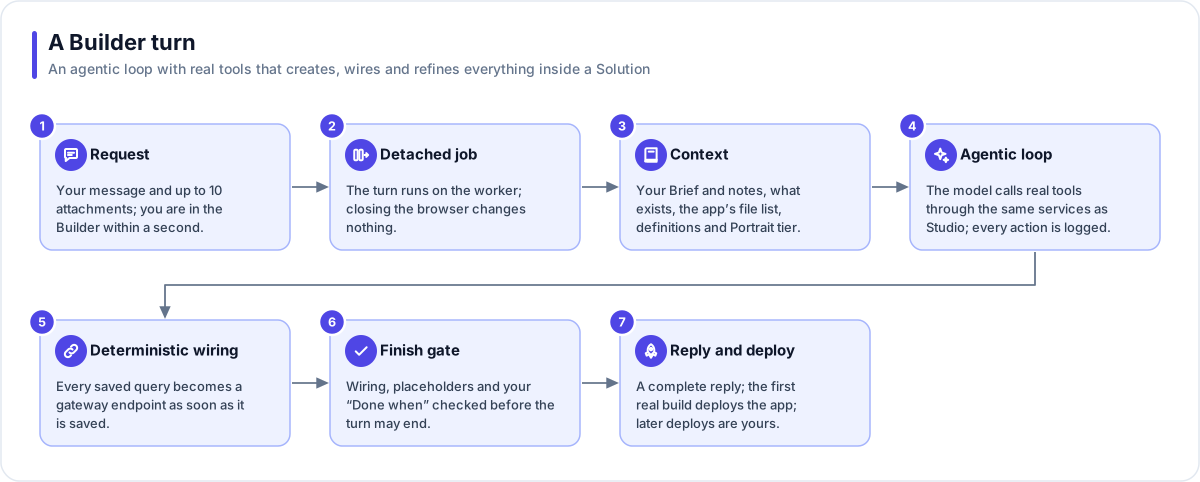
- Your request becomes a Solution at once. You are taken to the Builder as soon as the request and its files have uploaded, while the work continues in the background.
- Each turn is a durable background job. Closing the browser or losing your connection changes nothing; reconnect and the progress stream picks up where it left off.
- The Builder reads its context: your Brief and its own notes, a list of everything the Solution already owns, the app's files, and the business definition of each dataset: a Fact Base's provisioned definition (or its current one if it was never provisioned) and the richest Data Portrait available.
- It works through real tools. Every action goes through the same services the Studio uses, so access rules, validation, audit and versions all apply. It creates and edits Fact Bases, Data Portraits, LaunchPads, saved queries, Flows, Agents, Doc Bases, File Stores, Flex Gateways and Identities. It proposes Variables for you to confirm. It can publish the Flows and Agents it builds, and choose the Flows an Identity runs to set access tags; its data, query and gateway changes apply as it makes them, while the app's files wait in a Draft.
- Wiring is automatic. Once the build has an app, each read query becomes a gateway endpoint as soon as it is saved, and the next save or the finish wires any saved before the app existed, so the preview shows real data mid-build; queries that change data are exposed only on purpose.
- A finish gate checks the work. When the Builder declares a build finished, automatic checks wire the app's queries, require a list of any placeholders and assess your Done when points. An unmet point sends it back once, and most other checks can be set aside when one does not apply.
- You always get a reply. The first real build deploys the app by itself; after that, deploying is your decision, and a note reminds you when a deployed app has changes waiting.
Tip
A big change is not cut off halfway. A turn has a step limit, and when it reaches it mid-change it carries on once by itself. If it still has to stop, it saves what it finished and says so; reply continue and it picks up where it stopped.
Workspace and resource settings offer only Anthropic Claude models for the Builder. The chat header shows how full the Builder's memory is and what its work on this Solution has cost so far. Long conversations are summarised automatically, and nothing you built changes when that happens.
Example
The operations manager at a regional logistics company attaches a CSV export of last quarter's delivery exceptions and writes: "Build a tracker for late and damaged deliveries, by depot, with a map and a table I can filter. Done when: each depot shows its count; the map shows every exception." The Builder creates a Fact Base loaded with the rows, saves the queries, builds and deploys the app, and shows a table with the result for each point. The next morning she asks for "a weekly email to each depot lead listing their open exceptions", and the Builder adds a scheduled Flow for her to review and switch on.
Who uses it
| Persona | How they use it |
|---|---|
| Business user | Describes a team process and gets a working tool the same day |
| Analyst | Attaches data and asks for the views and summaries they need |
| Developer | Lets the Builder do the first cut, then fine-tunes resources by hand |
| IT and security | Relies on the same access rules, audit and versions applying to Builder-made resources |
| Functional user | Describes the process they own and gets a working prototype to try, without a development backlog |