Components
Flow
A visual workflow that runs on a schedule, a webhook, an in-app event or on demand, as a durable job recorded step by step.
- Everyone
- Technical
Last reviewed
A Flow is a workflow you can see. You lay out steps on a canvas: query data, call an API or a business application, ask an AI model, send an email, branch, wait, or put a form or a document in front of a person. Then you publish it, and it runs on a schedule, when a webhook arrives, when something happens in the Solution, or when someone presses a button.
Note
In one sentence: a Flow is the predictable half of a Solution's automation: you decide the path, and every run is recorded step by step. An Agent works out its own path, and the two can call each other.
Why it matters
- Automation you can read. The graph is the documentation: anyone can see what happens, in what order, and why a run went the way it did.
- Reliable by default. Every run is a durable job that survives restarts. Waiting for a person or a timer holds no resources.
- Outside effects are not repeated. An email, a write to an API or a business application is protected by an idempotency key, so a step that already succeeded is not repeated when it is retried.
- Nothing runs by accident. Runs use the published version, never the draft, and a Flow fires by itself only when it is both published and switched on.
Key concepts
| Term | What it means |
|---|---|
| Draft and published version | The draft is saved as you edit. Runs execute an immutable, numbered published version. |
| Enabled | Whether the Flow may start from its own trigger (schedule, event or webhook), and whether an Identity may run it to set access tags. Off by default, separate from publishing, and refused while a required Variable has no value. |
| Trigger | Exactly one per Flow: manual, schedule, webhook or event. |
| Run and step trail | One execution, with each step's input, output, status and timing. |
| Policy | Per step, under Retry & error handling: Max attempts (1 to 10), Backoff (ms) (0 to 60,000, doubled after each failed attempt), Timeout (ms) per attempt (0 to 60,000; 0 means none) and On failure. A number outside its range is flagged under the field and the Flow cannot be published until it is fixed. A branch is the label on a connection. |
| Waiting | A run parked on a delay, a form or a child Flow. It holds no worker and survives restarts. |
| Settings and files | A Flow can read Solution Variables, captured once per run. Files travel as references, never as bytes. |
How it works
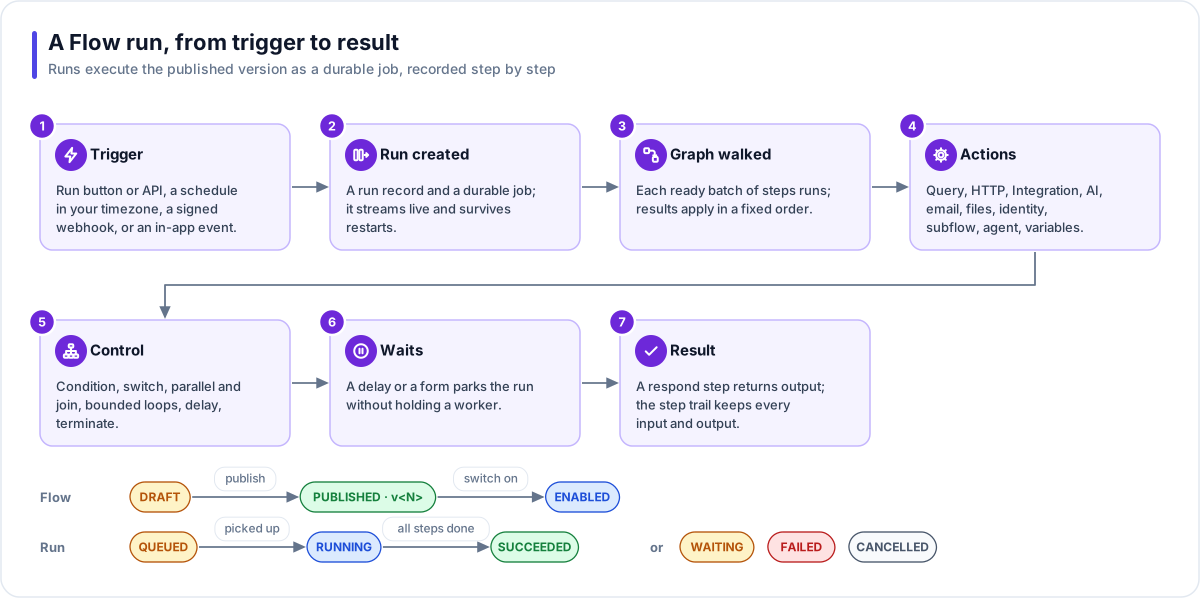
- Trigger. The Run button or the API (manual), a schedule in your timezone, a signed HTTP request (webhook), or an event inside the same Solution.
- Run created. A run record and a durable background job. It streams live and can be cancelled; if its worker dies mid-run, the run is marked failed rather than run twice.
- Graph walked. Each batch of steps that is ready runs at the same time, and results are applied in a fixed order.
- Actions. Query, HTTP request, Integration, AI generate, email, files, identity, subflow, agent, variables and notifications. Each has its own retry, timeout and failure policy.
- Control. Condition, switch, parallel and join, loops with a limit, delay and terminate.
- Waits. A delay or a form parks the run without holding a worker, until the time comes, someone answers, or the deadline passes.
- Result. A Respond step returns output to the app that called it. The step trail keeps every input, output, status and duration.
The step catalogue
The canvas palette groups the steps as below. Past the first four groups, each step sits under the kind of resource it works with.
| Group | Steps |
|---|---|
| Triggers | Manual · Schedule (cron in a named timezone) · Webhook (signed request) · Event (same Solution) |
| Logic | Condition · Switch · Parallel · Join (all, any or a count) · Loop over a list · Delay · Terminate |
| Utilities | Set variable · Respond · Notify · AI generate |
| Interactions | Form (collect validated input, with a timeout branch) · ViewPort (present a document and carry on) |
| Bots | Send channel message |
| Flows | Subflow |
| Agents | Run agent |
| Identities | Set access tags · List members · Verify domain · Provision identity |
| Connections | HTTP request · Integration · Send email |
| Fact Bases | Run query |
| File Stores | List files · Read file · Write file · Copy file · Delete file · Fetch to store (a web address into a store) · Send file (to an outside system) |
Webhooks
A webhook-triggered Flow gets an unguessable address and a signing secret. A caller sends a POST with
a JSON body and an X-Flow-Signature: sha256=<hex> header: an HMAC-SHA256 of the JSON body made with the
signing secret. An optional Idempotency-Key header means a repeated delivery returns the first run
instead of starting another. Calls are rate-limited per address. The secret is shown when you ask for it
and never appears in the graph, an export or a log; a copy or an import gets a new one.
At least once inside, not repeated outside
A step may run more than once, for example after a worker restart. So every outside effect (an email, an HTTP call that is not a read, an application write, a file send or fetch) first claims a key made from the run, the step and the loop iteration. A repeated step sees the claim and returns the first result. If a process stops between the effect and the record, the step refuses to repeat rather than risk doing it twice.
Where you work with it
Flows are listed under Executors → Flows. Each Flow has an Overview, a Builder canvas, a list of Runs with their step trails, Analytics across every run, and Versions. Its AI cost appears on its Solution's Usage, and on a LaunchPad's Usage when the run was started through that app's gateway. The Builder can create, publish and run Flows for you.
Works with
- Fact Base: through the Run query step, including saved write queries under a role that may write.
- Connection: lends credentials to HTTP, file, email and Integration steps for that step only.
- Integration: acts in a business application such as ServiceNow.
- Agent: a Flow can run a published Agent, and an Agent can run a published Flow.
- File Store, email and Bot: file steps, Send email and Send channel message.
- Flex Gateway: a flow endpoint lets an app or an outside system start a published Flow and receive its result. A Flow with a Set access tags step is refused there; an Identity runs it when someone signs in.
Governance and limits
| Area | What applies |
|---|---|
| Boundary | Everything a Flow references (Fact Base, subflow, Connection, Agent, File Store, file) must be in the same Solution. Checked at publish and again at run time. |
| Access | Webhooks use an unguessable address, a signature over the body, duplicate suppression and a per-address rate limit. |
| Versions | Runs execute the published version with the settings captured at the start, never the draft. |
| Safety | Every outside effect claims an idempotency key, so a step that already succeeded returns its first result when retried. Expressions are data, never code. Secret Variables reach only request headers and application inputs. A step that calls this platform's own gateway by its full web address gets a warning when you save and publish (publishing is not blocked); to run another Flow, use a Subflow step. |
| Limits | Subflows up to 5 deep; Agent and Flow chains 3 deep. A step tries 1 to 10 times, with a starting backoff and a per-attempt timeout of at most 60 seconds each. One open form per run; a form waits between 60 seconds and 7 days (24 hours by default). Up to 10 email attachments and 10 MB. Each Flow needs a name no other Flow in its Solution has (capitals and surrounding spaces are ignored). |