Capabilities
Knowledge and search
Make policies, manuals and other documents searchable by keyword and by meaning, with cited answers and per-document control over who sees what.
- Everyone
Last reviewed
Most organisational knowledge lives in documents: policies, handbooks, contracts, runbooks, product manuals. Flexday AI turns a collection of them into a searchable Doc Base that people and AI agents can ask questions of. Answers point back to the documents they came from, and each document can be limited to the people who should see it.
What you can do
- Search by meaning, not just by words. Hybrid search runs a keyword search and a meaning-based search together and ranks the combined results, so "how long do refunds take?" can find a passage that talks about "reimbursement within 14 days".
- Get answers with citations. When an Agent answers from a Doc Base, the retrieved documents whose wording matches its answer are cited, so people can check the source.
- Decide who sees which document. Tag a document with an audience such as
financeorhr, and only app and Teams users holding a matching tag can retrieve, cite or preview it, unless the Agent is set to search all documents; Studio users see everything. A change of tags applies on the next search. - Check what someone else would see. Preview search results as a chosen audience before you share anything.
- Keep the index fresh without lifting a finger. Link a File Store and switch on automatic indexing, and every new readable document that lands there and passes its safety check, uploaded in the Studio, through an app, by a Flow or by an Agent, becomes searchable by itself.
- Bring documents in several ways. Upload from your device, add files from a linked File Store, or add a web page by its address through the API (the crawl stays on that site).
- Stay searchable through an outage. If the meaning-based half of search is briefly unavailable, keyword search keeps answering.
- Keep unsafe files out. A file already found infected, or whose scan failed, is never indexed, and a quarantined file is never previewed. A document uploaded directly can be indexed while its scan is still running.
How it works
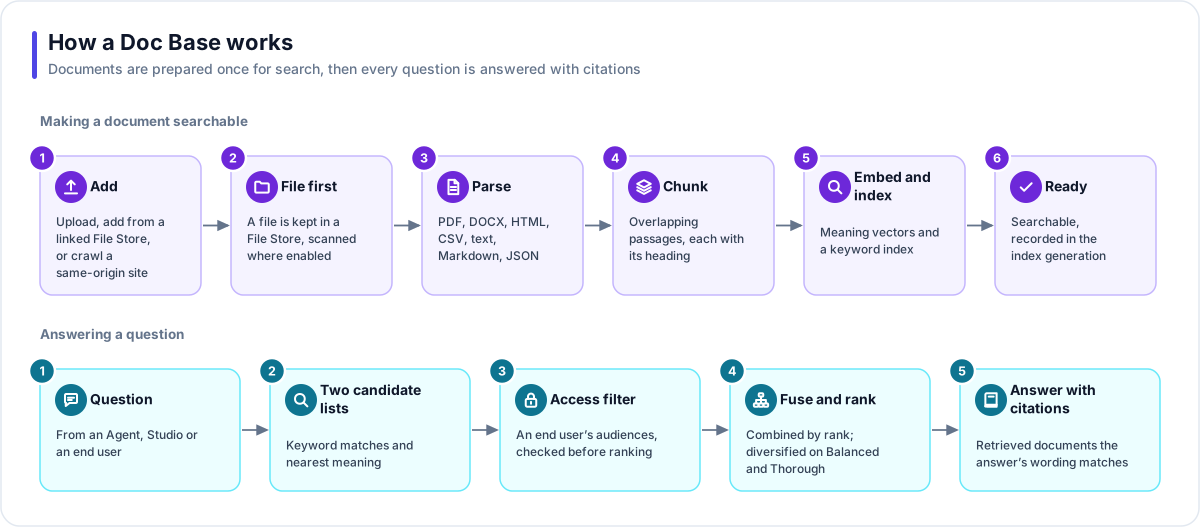
Adding a document. The bytes are stored first in a governed File Store and checked, and scanned for malware where the deployment has scanning switched on. The document is then parsed (PDF, Word .docx, HTML, CSV, TSV, plain text, Markdown, JSON and JSON Lines; images and other types cannot be added), split into overlapping passages of about 2,000 characters broken at paragraph or sentence ends, turned into embeddings by the Doc Base's chosen model, and indexed for both keyword and semantic search. Each passage remembers its document and its nearest heading.
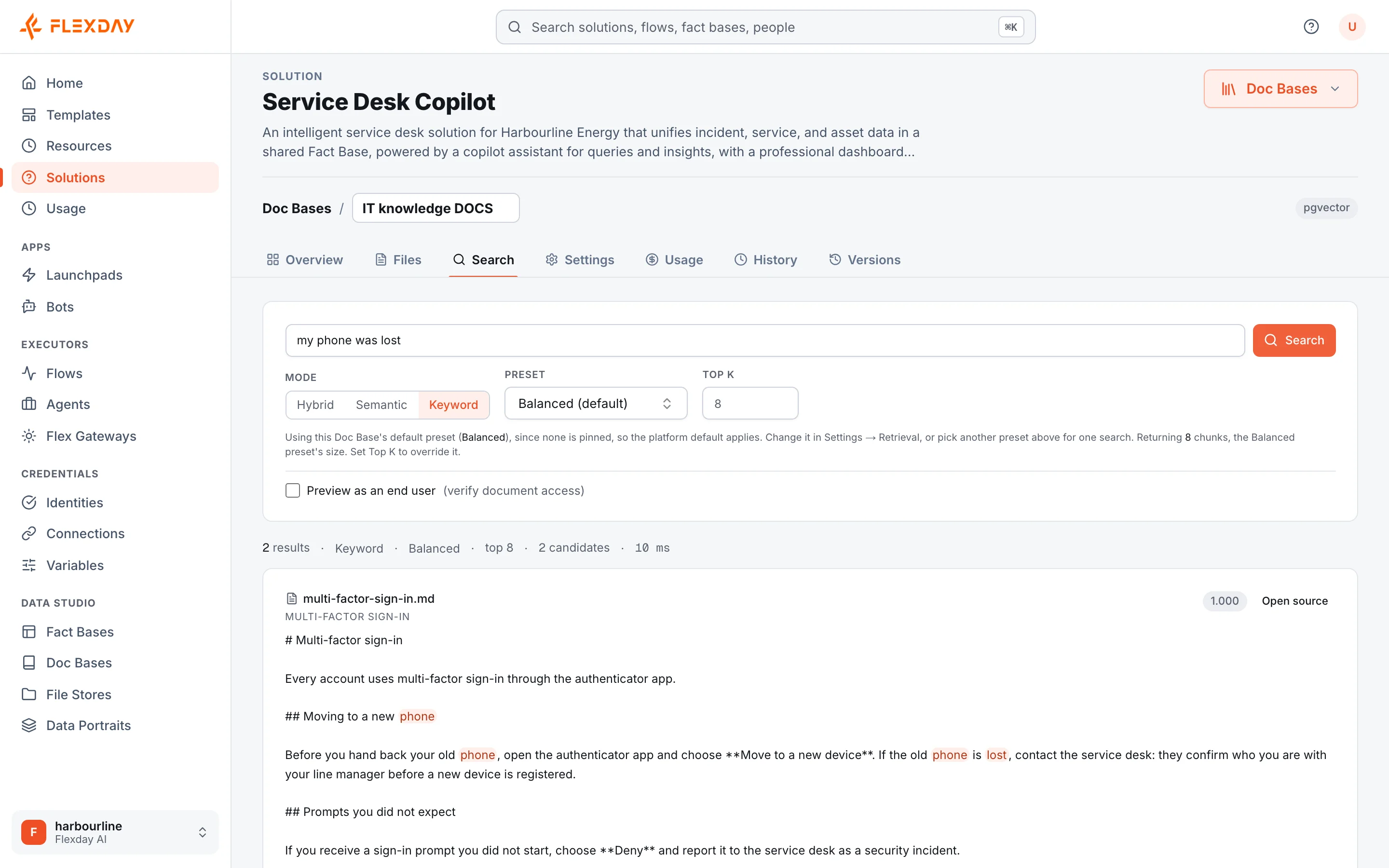
Answering a question. A question from the Studio, an Agent or an app produces two candidate lists, one by keyword and one by meaning. They are filtered by audience for anyone who is not a trusted Studio user, then fused by rank, and returned with the documents they came from. Presets (fast, balanced or thorough) trade speed for breadth.
Using it in conversations. An Agent searches a Doc Base through an explicit grant. With grounding switched on, the Agent is instructed to search your knowledge before stating facts about your business and to say when it cannot find an answer, and it is reminded once if it answers without searching. End users reach it through an app's agent endpoint on the Flex Gateway, and their audiences come from their sign-in and any tags assigned to them.
Important
A Doc Base is one shared index. If each person's uploads must stay private to them, do not switch on automatic indexing for the store that receives them.
Example
An insurer's claims department loads its claims handbook and several hundred policy wordings into a
Doc Base. Underwriting guidance is tagged underwriting, so only people whose sign-in carries that tag
can retrieve it. A claims Agent with grounding switched on answers handlers' questions, such as
"is water damage from a burst pipe covered under the standard home policy?", with the relevant clause
cited. When compliance issues a new circular, they drop it into the linked File Store and it is
searchable shortly afterwards, with no one touching the Studio.
Who uses it
| Persona | How they use it |
|---|---|
| Business user | Asks questions of policies and manuals and gets cited answers |
| Analyst | Tunes search modes and presets and checks results in the Search tab |
| Developer | Links File Stores, wires automatic indexing and grants Agents search access |
| IT and security | Controls visibility with audience tags and turns on malware scanning where the deployment offers it |
| Functional user | Puts the knowledge their team relies on in reach of everyone who needs it, with traceable answers |