Governance
Governance overview
How Flexday AI keeps your data and your AI safe - nested trust boundaries, and the controls built into every layer rather than added afterwards.
Written for
- Everyone
- Functional users
Last reviewed
Flexday AI lets people build software by describing it. That only works if what they build is safe by default. So governance is part of the platform, not a layer added on top: your data sits behind nested boundaries, each enforced on its own, and every capability comes with its controls built in. A few, such as malware scanning, are switched on per deployment.
At a glance
- Four nested boundaries. The platform, your workspace, each Solution, and each resource inside it. Each is enforced separately, so losing one does not open the others.
- Enforced where it cannot be skipped. Each workspace's Solutions and their contents are isolated by the database itself, not just by application code.
- Secrets never travel. Credentials are encrypted, used only while a step runs, and never returned, logged or exported.
- AI inside guardrails. Agents act only through tools you grant, behind deterministic checks, with enforced budgets and citations.
- Changes and reads are recorded. Changes to your configuration and resources are in the audit trail with the person behind them; file reads and model calls have records of their own.
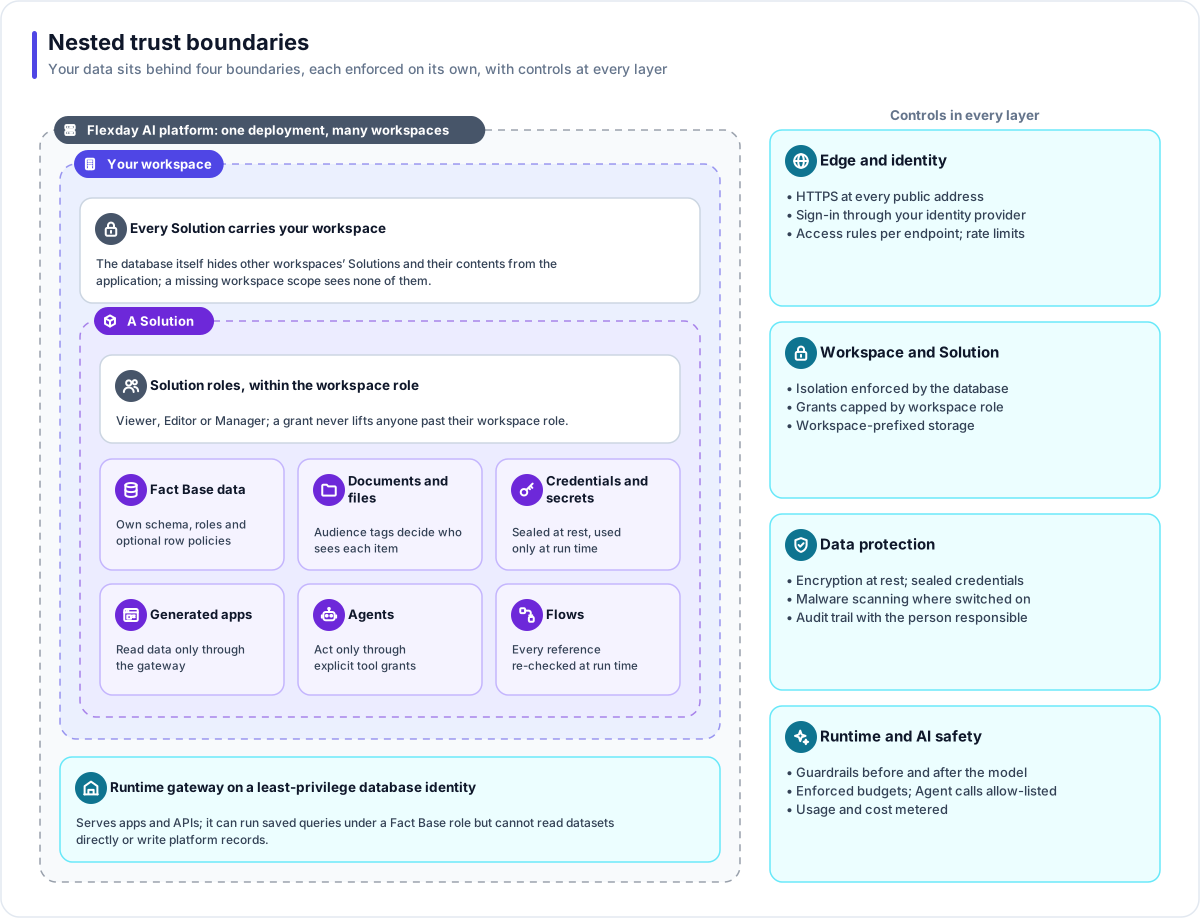
The boundaries
| Boundary | What it keeps apart | How it is enforced |
|---|---|---|
| Platform | Your workspace from every other customer's | Row-level security in PostgreSQL; workspace-prefixed storage; a separate staff plane whose support sessions need your workspace's setting |
| Workspace | Your people and settings | Your sign-in, your roles, your settings for AI models |
| Solution | One project from another inside your workspace | Solution roles; references across Solutions refused at run time; Restricted visibility, set by the platform's operators |
| Resource | What each part may touch | Fact Base roles and row policies, audience tags on documents and files, Agent tool grants, Identity rules on endpoints |
The controls
| Layer | Controls |
|---|---|
| Edge and identity | HTTPS on every public address and encrypted database connections; sign-in through your identity provider; per-endpoint access rules; rate limits |
| Workspace and Solution | Isolation enforced by the database; Solution grants capped by workspace role; workspace-prefixed storage |
| Data protection | Encryption at rest; sealed credentials; files can be scanned before they are served, and a file awaiting or failing a scan is never served; audit trail with the person responsible |
| Runtime and AI safety | Guardrails before and after the model; enforced budgets; allow-listed outbound calls for Agents; usage and cost metered |
Principles that run through every page
- Fail closed. A missing scope sees none of the records row-level security protects, an unreachable secret store stops rather than falling back, and an unknown address is refused rather than guessed.
- Refuse, then explain. A refused action explains itself in plain language, unless the explanation would reveal something, such as whether a hidden item exists.
- Drafts for what runs. Apps, Flows and Agents change on drafts and are published or deployed as numbered versions; settings such as Identities and credentials apply when saved.
- Deterministic checks around AI. The model proposes; code checks. Recurring AI mistakes are fixed in code, not with another instruction to the model.
- Plain language on screen. Messages people see are written in plain language and avoid the platform's own internal names.
The governance pages
| Page | Question it answers |
|---|---|
| Identity and access | Who can sign in, and what can each person do? |
| Data isolation | How is my data kept apart from everyone else's? |
| Secrets and encryption | How are credentials and data protected? |
| AI safety | How do Agents and the Builder stay within bounds? |
| File safety | How are uploaded files checked and served? |
| Change control and versioning | How do changes reach production safely? |
| Audit, usage and cost | Who did what, who read what, and what did it cost? |
| Data lifecycle and portability | How is data retained, exported and deleted? |
| Platform operations | What can Flexday staff see and do? |
What an evaluator can verify
Each governance page ends with a What an evaluator can verify section that says where in a trial to look to confirm its controls. To start:
- Identity and access: members, roles, grants and support access.
- Data isolation: two workspaces that cannot see each other, and Fact Base roles.
- AI safety: grants, guardrails and evaluations.
- Audit, usage and cost: the records of who did what.
For the questions a buying committee asks, see Evaluating Flexday AI.