Components
Identity
The named sign-in settings a Flex Gateway checks callers against, from single sign-on and SAML to API keys, signatures and certificates.
- Everyone
- Technical
Last reviewed
An Identity decides who may call a Solution's Flex Gateway, and how they prove it. It might be your company's single sign-on, a customer-facing identity provider, a SAML provider federated through a user pool, or a machine credential such as an API key. It answers "who is this end user?" for the apps and APIs you build, which is separate from how your builders sign in to Studio.
Note
In one sentence: an Identity is the named set of sign-in settings a gateway checks every caller against: nine mechanisms, 30 provider presets, and rules for who may get in.
Why it matters
- Your users sign in the way they already do. Microsoft Entra ID, Okta, Auth0, Amazon Cognito, Google, a SAML provider and many more, with no provider-specific code in the app.
- Machines are first-class callers. API keys, signed requests, Basic credentials and client certificates for partner systems and scripts.
- Access follows your directory. Claims from the sign-in (groups, email domain) can decide who gets in and which documents they see.
- Secrets stay on the server. The browser never holds a client secret: where a provider needs one, the gateway completes the sign-in.
Key concepts
| Term | What it means |
|---|---|
| Mechanism | How a caller proves who they are. Fixed when the Identity is created. |
| Provider preset | Which identity provider, with its issuer, keys, algorithms and claim mapping filled in. 30 presets, or any OpenID Connect provider. |
| Claim map | Which claims name the caller's subject, email, display name and groups. Per-provider defaults, adjustable per Identity. |
| Rules | Required scopes, required claims and allowed email domains. Every rule fails closed. |
| Access tags | Audience tags a person holds. An admin grants them on the Members tab, or invites someone by email before their first sign-in. A Flow can set them too: the On sign-in Flow when the person signs in, and the For existing members Flow when an admin asks. See Access tags. |
| Dynamic mode | A gateway that picks the Identity per caller from their token's issuer, so one app can serve several organisations. |
How it works
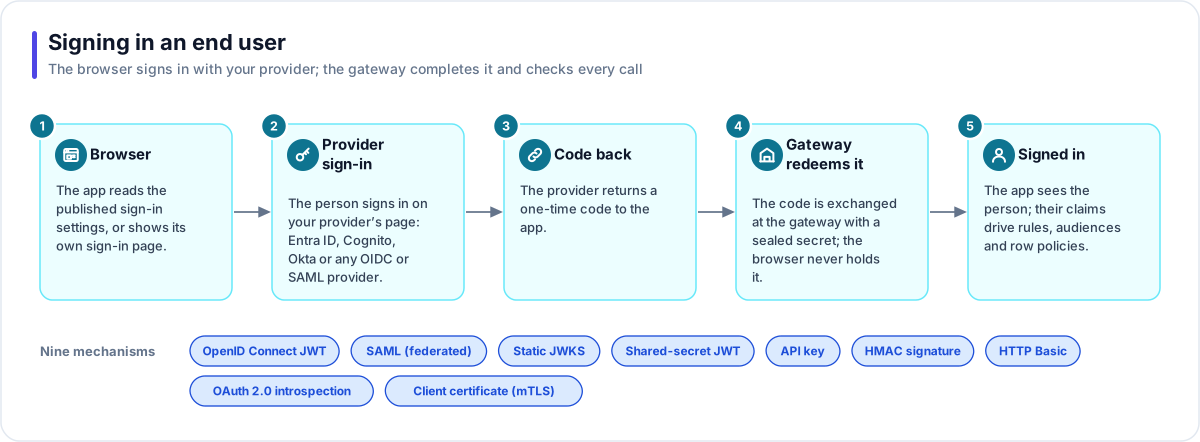
- Browser. The app reads the gateway's published sign-in settings, or shows its own sign-in page. Except for a Microsoft sign-in, it asks the gateway where the provider's sign-in page is, so a provider that blocks lookups from a browser still works.
- Provider sign-in. The person signs in on the provider's own page. Microsoft presets use MSAL; every other redirect provider uses the Authorization Code flow with PKCE (a one-time proof that protects the code).
- Code back. The provider returns a one-time code to the app.
- Gateway redeems it. The code is exchanged on the server, with a client secret sealed at rest. The token address comes only from the Identity's own settings (its issuer, the provider's fixed address, or one pinned on the Identity), so a crafted request cannot send the exchange anywhere else. GitHub returns no ID token; the gateway asks GitHub who signed in and hands the app that profile.
- Signed in. The app sees the person, and the gateway adds them to the Identity's Members list, applies any email invitation waiting for them and runs the Identity's On sign-in Flow if it has one. A Microsoft sign-in, which finishes in the browser, is reported to the gateway so the same happens. Their claims drive the rules, their audiences and any Fact Base row policies.
Nine mechanisms
| Mechanism | Typical use |
|---|---|
| OpenID Connect JWT | Most single sign-on and customer identity providers |
| SAML (federated) | A SAML provider registered on a user pool that issues tokens |
| Static JWKS | Tokens checked against keys you paste in |
| Shared-secret JWT | HS256 tokens signed with a secret you share |
| API key | A partner service, a scheduled job, an internal tool |
| HMAC signature | A caller that signs each request |
| HTTP Basic | A username and password from a server |
| OAuth 2.0 introspection | Opaque tokens checked by asking the provider |
| Client certificate (mTLS) | A certificate forwarded by your edge proxy, where your deployment enables it |
SAML without SAML code
SAML works by browser redirects and signed assertions, so there is no token an API can check directly. Flexday AI accepts a customer's SAML provider by federating it through a user pool that does issue tokens: an Amazon Cognito user pool, a Microsoft Entra External ID tenant or another OpenID Connect issuer. You register the SAML provider on the pool, create a SAML (federated) Identity that names the pool, and the app's sign-in is an ordinary redirect to the pool, which sends the person to their SAML provider and back. See the Service Desk Copilot's authentication for a worked example with Cognito.
Provider presets
| Family | Examples |
|---|---|
| Microsoft | Microsoft Entra ID, Microsoft Entra External ID, Microsoft account |
| Popular | Okta, Auth0, Ping Identity, ADFS, Amazon Cognito, SAML (federated) |
| Self-hosted | Keycloak, ZITADEL, authentik, FusionAuth, Ory Hydra, Duende IdentityServer |
| Developer platforms | Firebase, Supabase, Clerk, WorkOS, Stytch, Descope, Frontegg, GitHub Actions |
| Social and consumer | Google, Sign in with Apple, LinkedIn, Facebook, X, GitHub |
| Generic | Any OpenID Connect provider; machine callers |
Access tags
A person's access tags decide which documents and files they may see. There are three ways to give them:
- By hand. On the Members tab, an admin grants a tag to anyone who has signed in. Invite by email (or Bulk import) grants a tag to someone who has not signed in yet. It applies at their first sign-in, and only when the provider vouches for that email address.
- On sign-in. The Identity's On sign-in setting names a Flow with a Set access tags step. It runs as the person signs in, before the app's first call, and receives what the sign-in verified: their subject, email, name, groups and other claims. It runs once per person: if that run fails, it runs again at their next sign-in. It never blocks the sign-in.
- For existing members. The For existing members setting names the Flow an admin runs for one person from the Members tab ("Re-evaluate tags for name now"). It receives the same details, from that person's latest sign-in.
Either setting can pick a Flow that is published and switched on, has a Set access tags step for this Identity, has no step that waits for a person and has no webhook trigger. A Flow that can't be picked yet is listed under Not listed? with its reason, and Enable switches one on in place when that is all it needs. A Flow that sets access tags can't be put on a Flex Gateway endpoint, because whoever called it would choose whose access changes.
The Set access tags step takes its tags as a list, a comma- or line-separated text, a JSON array,
or the rows of a query that returns one column. Each value is tidied into a tag (Grade 5 becomes
grade-5). A value that can't become a tag is skipped and reported in the step's output. A value that
resolves to nothing, a query with several columns, or more than 100 tags fail the step instead, so a
mistake never wipes anyone's access; [] means "no tags". Its Write mode either replaces the tags
this Flow gave the person (an admin's grants stay) or only adds tags. It always targets a signed-in
person, never an email address.
Testing an Identity
The Check a credential card validates a token or key you paste and shows the mapped subject, email and groups with a pass or fail for every rule. Where an Identity opts in, admins can also test as a member, and turning that option off ends every test session on its next request.
Where you work with it
Identities are listed under Credentials → Identities. An Identity's Configuration tab groups its settings into cards: Provider, Credential (write-only secrets), Token, Browser sign-in, Claim mapping, Authorization rules and Advanced. Its Members tab lists everyone who has signed in with the access tags they hold, and email invitations for people who have not signed in yet; it refreshes itself while you watch. Above the tabs, On sign-in and For existing members each name the Flow that sets access tags.
Works with
- Flex Gateway: a gateway uses one Identity, or picks one per caller in dynamic mode.
- Flow: a Flow can set a person's access tags, list an Identity's members, verify a domain and add a new sign-in option for it.
- Doc Base and File Store: audiences from claims and tags decide what a person may see.
- Fact Base: the signed-in subject reaches row policies.
Governance and limits
| Area | What applies |
|---|---|
| Boundary | Owned by one Solution. The mechanism cannot change after creation. |
| Access | A failed rule answers "forbidden" and names the rule. Secrets are write-only and never returned; API keys are shown once. |
| Safety | Symmetric and asymmetric token algorithms are never mixed up. Introspection fails closed. Client certificates are refused unless the deployment enables them. |
| Sign-in | OpenID Connect and SAML (federated) Identities, and the GitHub preset, can sign a person in from an app. A few presets (Firebase, Supabase, Stytch, GitHub Actions, Facebook and X) only check tokens people got elsewhere, and the Studio says so. The machine kinds verify a credential the caller already holds. |
| Sign-out | Signing out of an app also revokes the person's refresh token where the provider supports it (except on a gateway in dynamic mode), so a copied token stops working. Microsoft sign-ins can't be revoked this way: their refresh token lasts until it expires, at most 24 hours after sign-in. |
| Limits | Positive introspection results are cached briefly; negative ones never are. Access tag and sign-in limits are on Limits and quotas. |