Use cases › Service Desk Copilot
Authentication
How each caller of the Service Desk Copilot proves who it is: SAML through Amazon Cognito, Microsoft Teams, a ServiceNow API key and Studio sign-in.
- Technical
Last reviewed
Four kinds of caller reach the Service Desk Copilot, and each proves who it is differently. IT staff signing in to the dashboard use Harbourline's SAML identity provider, federated through an Amazon Cognito user pool. Employees in Teams are vouched for by Microsoft. ServiceNow presents an API key. Builders sign in to Studio with the workspace's own sign-in.
At a glance
| Caller | Where | How they prove it | Configured on |
|---|---|---|---|
| IT staff and managers | The dashboard | SAML at Harbourline's provider, through a Cognito user pool | The Harbourline SSO Identity on the Service desk gateway |
| Employees | Microsoft Teams | Microsoft's Bot Framework signature on every message | The Service desk bot |
| ServiceNow | The intake gateway | An API key in the X-Api-Key header | The ServiceNow push key Identity |
| Builders | Studio | The workspace's own sign-in and roles | Workspace settings |
Dashboard sign-in: SAML through Cognito
SAML works by browser redirects and signed assertions, so there is no SAML token an API can check. Flexday AI therefore accepts Harbourline's SAML provider by federating it through a Cognito user pool, which does issue tokens. The app needs no SAML code: it performs an ordinary redirect sign-in against the pool.
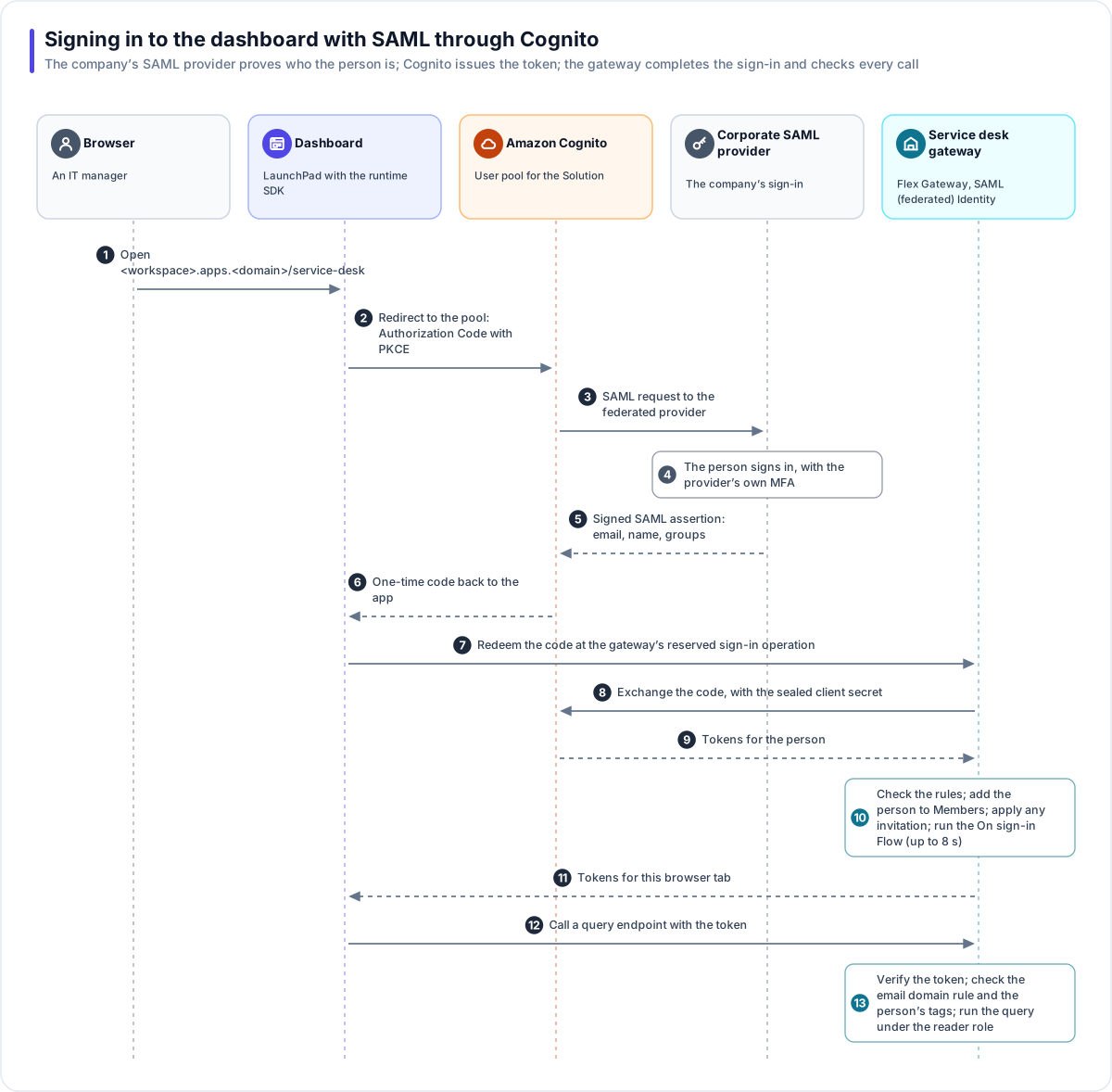
- An IT manager opens the dashboard on Harbourline's apps address.
- The runtime SDK redirects the browser to the Cognito user pool, using the Authorization Code flow with PKCE (a one-time proof that protects the code in transit).
- Cognito sends a SAML request to Harbourline's SAML provider.
- The person signs in there, with whatever multi-factor authentication the provider requires.
- The provider returns a signed SAML assertion to Cognito, with the person's email, name and groups.
- Cognito returns a one-time code to the app.
- The app redeems the code at the gateway's reserved sign-in operation, which no endpoint can override.
- The gateway exchanges the code with Cognito using the app client's secret, which is sealed at rest. The browser never holds that secret.
- Cognito returns the person's tokens to the gateway.
- The gateway checks the new token against the Identity's rules, adds the person to the Identity's Members list, applies any invitation waiting for their email and runs its On sign-in Flow, waiting up to 8 seconds for it. Then it hands the tokens to that browser tab.
- The dashboard calls a query endpoint with the token.
- The gateway verifies the token against the pool, checks the Identity's rules and the person's access tags, and runs the saved query under the Fact Base's reader role.
Setting it up
In Amazon Cognito (done by Flexday operators for a Solution's own user pool, with self-registration switched off, or by your AWS team in a private deployment):
- Create a user pool for the Solution.
- Add Harbourline's SAML provider to the pool, using its metadata, and map its attributes: at least email and name.
- Create an app client with a client secret, the Authorization Code grant and the
openid,emailandprofilescopes, with the dashboard's address as an allowed callback and as an Allowed sign-out URL (without it, signing out leaves the person on Cognito's own sign-in page). Keep token revocation switched on for the app client (the default for app clients created since 2021), so signing out of the dashboard also revokes the person's refresh token. - Give Harbourline's SAML provider Cognito's service provider details, so it trusts the pool.
In Flexday AI (in Studio, under Credentials → Identities):
- Create an Identity with the SAML (federated) preset, federating through Amazon Cognito.
- Enter the pool's issuer (
https://cognito-idp.<region>.amazonaws.com/<pool-id>) and, as the API audience, the app client ID. - Under Browser sign-in, enter the app client ID and its secret. The secret is write-only.
- Under Authorization rules, allow the email domain
harbourline.example. - Attach the Identity to the Service desk gateway. Its endpoints inherit, so every one now requires sign-in.
- Use Check a credential with a real token to see the mapped subject, email and groups, and a pass or fail for each rule.
Tip
If your SAML provider sends group membership, you can map it to a user-pool attribute and point the Identity's group claim at it. Check how your pool formats a multi-valued attribute before you write a rule that depends on it.
Who sees runbooks
The IT knowledge Doc Base tags runbooks it-staff. Dashboard users receive that tag in one of two ways:
- By hand. An admin grants
it-staffto members on the Identity's Members tab, or uses Invite by email for someone who has not signed in yet. - By a Flow. The Identity's On sign-in setting names a Flow with a Set access tags step. It
runs as the person's sign-in completes, before the dashboard's first call, and receives what the
sign-in verified: their subject, email, name, groups and other claims. Once the pool passes on
Harbourline's groups (see the tip above), one step is enough: Tags set to
{{trigger.authContext.groups}}, which makes a tag of each group name (a group namedIT Staffbecomesit-staff). The Flow can instead look the person up by email with a query and tag them from its rows. It runs once per person. If that run fails, it runs again at their next sign-in, and a failure never blocks the sign-in. To update someone's tags later, an admin re-evaluates them on the Members tab, which runs the Identity's For existing members Flow.
The Service desk agent's endpoint on the gateway then filters every search by the tags the signed-in person holds.
Teams users
Employees never sign in to Flexday AI. Microsoft's Bot Framework delivers each Teams message to the Bot's webhook with a signature, which is verified against the Bot's own registration. Teams tells the platform the person's Microsoft account identifier and their organisation, not their email or groups. So:
- The Agent answers from articles with no audience tag, and runbooks stay in the dashboard.
- Ticket status is returned by ticket number, with only the fields any employee may see.
- To raise a ticket, the Agent asks for the work email it needs to find the caller in ServiceNow.
See Teams experience.
ServiceNow
ServiceNow is a machine caller, so it uses the ServiceNow push key Identity (kind: API key) on the intake gateway.
| Step | Detail |
|---|---|
| Create the key | On the Identity; it is shown once and stored only as a fingerprint. |
| Store it in ServiceNow | In the outbound REST message's header configuration, protected as ServiceNow recommends for credentials. |
| Rotate | Create a new key, update ServiceNow, then revoke the old one; revocation applies at once. |
| Limit | The gateway applies a per-caller rate limit to the flow endpoint. |
In the other direction, Flexday AI calls ServiceNow through the ServiceNow Connection with OAuth client credentials: a short-lived token, cached until just before it expires, requested only from the Connection's own instance address.
Builders
Harbourline's builders sign in to Studio through the workspace's own sign-in (for example federated to the same corporate provider), and work under their workspace and Solution roles. Their sign-in is separate from the dashboard's Identity: being able to build the Solution does not make someone a dashboard user, and the other way round. See Identity and access.