Components
Fact Base
A live, queryable dataset with a business meaning layer, built from sample data or an existing schema, that apps, Flows and Agents read from.
- Everyone
- Technical
Last reviewed
A Fact Base is a Solution's structured data. Give it a spreadsheet, a JSON file or an existing database schema; it works out what the data means, creates a live database schema of its own and loads your rows. Its saved queries are what generated apps, Flows and Agents read from, and what a Flow can write through.
Note
In one sentence: a Fact Base turns a file into a live, governed dataset with its own database schema, its own roles and a written description of what every table and column means.
Why it matters
- From spreadsheet to live data in minutes. No database team, no schema design meeting.
- Meaning, not just columns. Every table and column carries a description, keys and relationships that apps, Agents and people can rely on.
- Safe to change. Schema changes are shown as a plan first and applied all-or-nothing. A reload never empties a table you did not name.
- Least privilege by default. Apps and Agents read under a Fact Base role, and optional row policies let each end user see only their own rows.
Key concepts
| Term | What it means |
|---|---|
| Base schema | The mechanical shape inferred from your data. |
| Definition | The meaning layer on top: descriptions, keys, relationships, checks and indexes. Everything downstream reads it. |
| Verified | You have confirmed a table's definition. Once every table is verified the Fact Base can be provisioned. |
| Provisioned | The live schema exists. The provisioned version is what consumers read, never unsaved edits. |
| Provenance | Every structural detail is marked as inferred or yours. Inference never overwrites what you wrote. |
| Saved query | A name, one SQL statement and its parameters. Reads become gateway endpoints; writes are exposed only on purpose. |
| Roles and row policies | Reader and writer roles by default, custom roles with a permission matrix, and optional row filters so end users see only their rows. |
How it works
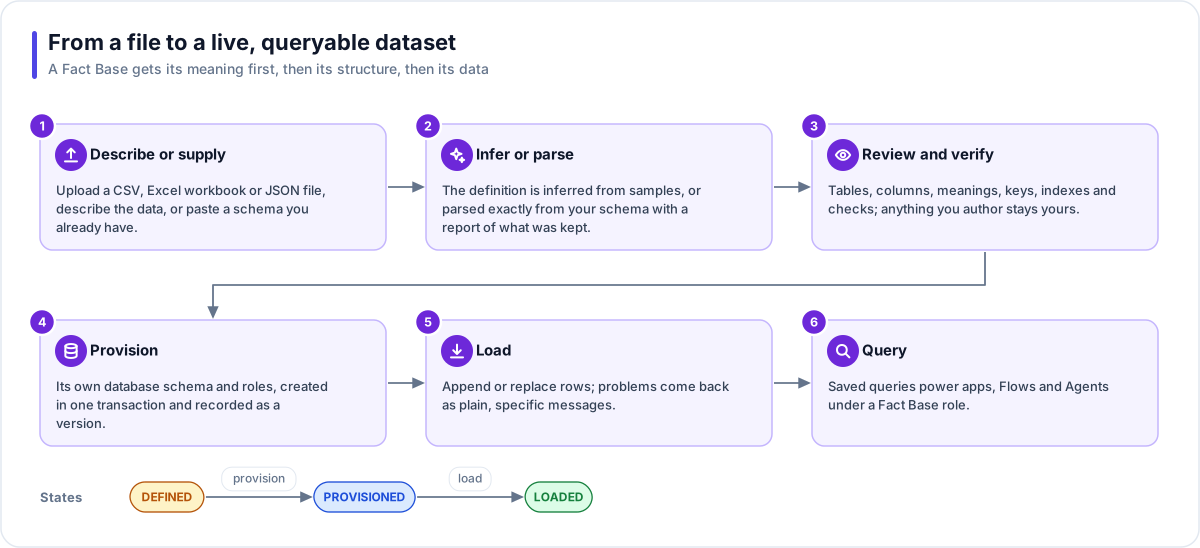
- Describe or supply. Attach a CSV or JSON file in the Builder (loaded exactly as supplied; save an
Excel workbook as CSV first), paste sample JSON, or supply a
CREATE TABLEscript from an existing database. - Infer or parse. From sample data, AI infers the meaning: names, descriptions, keys and relationships. A schema you already have is parsed, not guessed, and you get a report of what was kept, translated and dropped.
- Review and verify. Answer any open questions, and edit indexes, checks, relationships and lists of allowed values. Mark each table verified.
- Provision. One transaction creates the schema, its keys and constraints, and the reader and writer roles. A version is recorded.
- Load. Rows are checked against the definition. You choose to append or replace, and every problem is named in plain terms: a duplicate, a missing required value, a broken reference.
- Query. Saved queries with parameters become the data source for apps, Flows and Agents.
Changing a live Fact Base
A later change to the structure is one of two things:
- A keep-data migration. You see the exact changes first. The plan you saw is exactly the plan that runs, once, in a single transaction.
- A destructive re-provision. It rebuilds the schema from the definition. You confirm it explicitly.
Replacing data empties only the tables your new data names, and refuses to empty a table a live app writes to unless you asked to reset it. Clear data shows the exact row counts first and runs only if they still match.
Reading and writing at run time
| Caller | How it reaches the data |
|---|---|
| A generated app | Calls a saved query through its own address; the Flex Gateway runs it under the endpoint's Fact Base role. |
| A Flow | A Run query step runs a saved query. A saved write query (insert, update or delete) runs only under a role that holds that permission. |
| An Agent | Uses a Fact Base grant, which defaults to the read-only reader role. An Agent's own Fact Base tool never writes. |
| You in Studio | The query editor is schema-aware and suggests tables and columns as you type. Ad hoc queries are read-only; writes must be saved first. |
Tip
Want an outside system to push data in? Save a write query (for example an insert that updates the row when it already exists), put it in a Flow, and expose the Flow on a gateway endpoint. The Service Desk Copilot use case shows the pattern.
Where you work with it
Fact Bases are listed under Data Studio → Fact Bases. Each one has views for its definition, its tables and data, saved queries, roles and row policies, validation findings, and the shared Insights views. An optional Data Portrait adds a measured profile and a business ontology.
Works with
- LaunchPad: apps connect to Fact Bases in the same Solution and query only the connected ones.
- Flex Gateway: each saved read becomes an endpoint under a Fact Base role; a write needs a writer role.
- Flow and Agent: Flows run saved queries; Agents query through an explicit grant.
- Builder: creates, alters (plan first), loads and clears Fact Bases as you chat.
- File Store: the sample data you supplied is kept as a file in a store the Fact Base manages.
Governance and limits
| Area | What applies |
|---|---|
| Boundary | Owned by one Solution in one workspace, with its own database schema. Apps may query only connected Fact Bases in the same Solution. |
| Access | Reader and writer roles plus custom roles with a permission matrix; optional row policies. A saved query is one statement, and a write runs only under a role that may write. |
| Versions | Every provision records a version; consumers read the active version, never unsaved edits. Versions are append-only. |
| Safety | A schema change is a plan you see first, applied all-or-nothing. A replace never empties a table nobody named, nor a live app's data unasked. |
| Limits | Sample data uploads are capped (the upload form shows the limit) and count against workspace storage. The number of Fact Base schemas per workspace follows your plan. |